Talent selection
Review your talent supply and map the right people to the right positions.
Trusted by global enterprises









The right talent for the right roles
When planning large-scale workforce changes, success is often determined by matching the right talent to the right positions.
But mapping thousands of employees to thousands of positions is not easy. When visualizing the talent you have and the talent you need, many variables such as skills, financial planning, location preferences and hybrid working need to be taken into consideration as you make decisions.
Planners need a platform that simplifies how they see their talent supply and demand and allows them to map the right people to the right positions, so they can confidently manage their future design.
Want to know more?
How Orgvue helps
Orgvue is an organizational design and workforce planning platform, purpose-built to handle large amounts of data and offer advanced data visualization capabilities. It brings your HR and finance data together, so you can see your talent supply and link it to unassigned or changed positions for a fast and effective transition process.
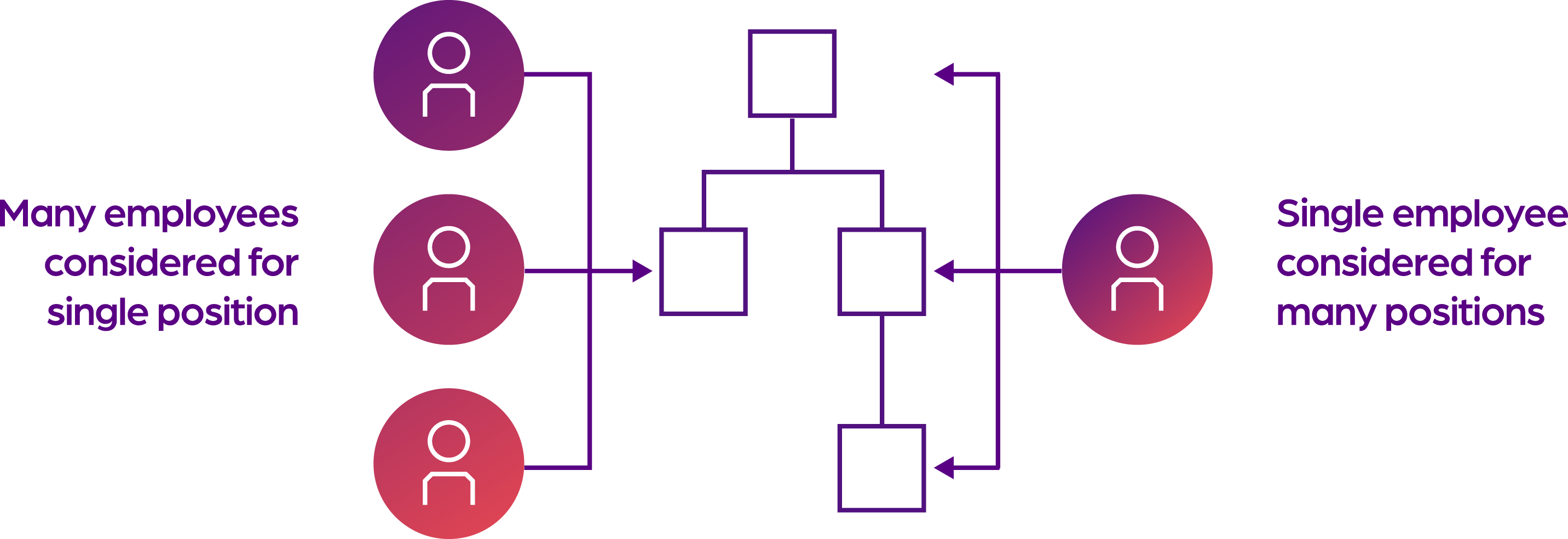
Manage your talent selection process
See what activities are being done and by whom, and where there might be a need for redesign, so you can model changes to your workforce.

Analyze
Visualize your data in a powerful way
- Bring your people and positions data together in a single source of truth
- See talent availability, nominate applicants based on criteria such as skills, location or preferences, and highlight potential gaps

Design
Map people to positions and build talent pools
- Connect candidates to target positions
- Using Orgvue’s drag-and-drop functionality, assign people to positions and build talent pools
- Confirm selections after considering all your options

Plan
Validate selection and manage the transition process
- View the impact of your decisions at a granular level
- Let Orgvue highlight errors, such as teams being over capacity
- Manage exits and movements as required

Monitor
Review your selection and engage stakeholders
- View the financial impact of your decisions at a granular level and as a whole
- Assign responsibility to the implementation team
- Share your progress with stakeholders
Match the right people to the right positions
Build talent pools for positions before validating your selection
After integrating your data from different sources into the platform, use Orgvue’s drag-and-drop functionality to create talent pools by selecting talent based on role requirements. When you’re ready, confirm candidates and let Orgvue flag errors for your attention; for example, when the same person has been confirmed for two roles.
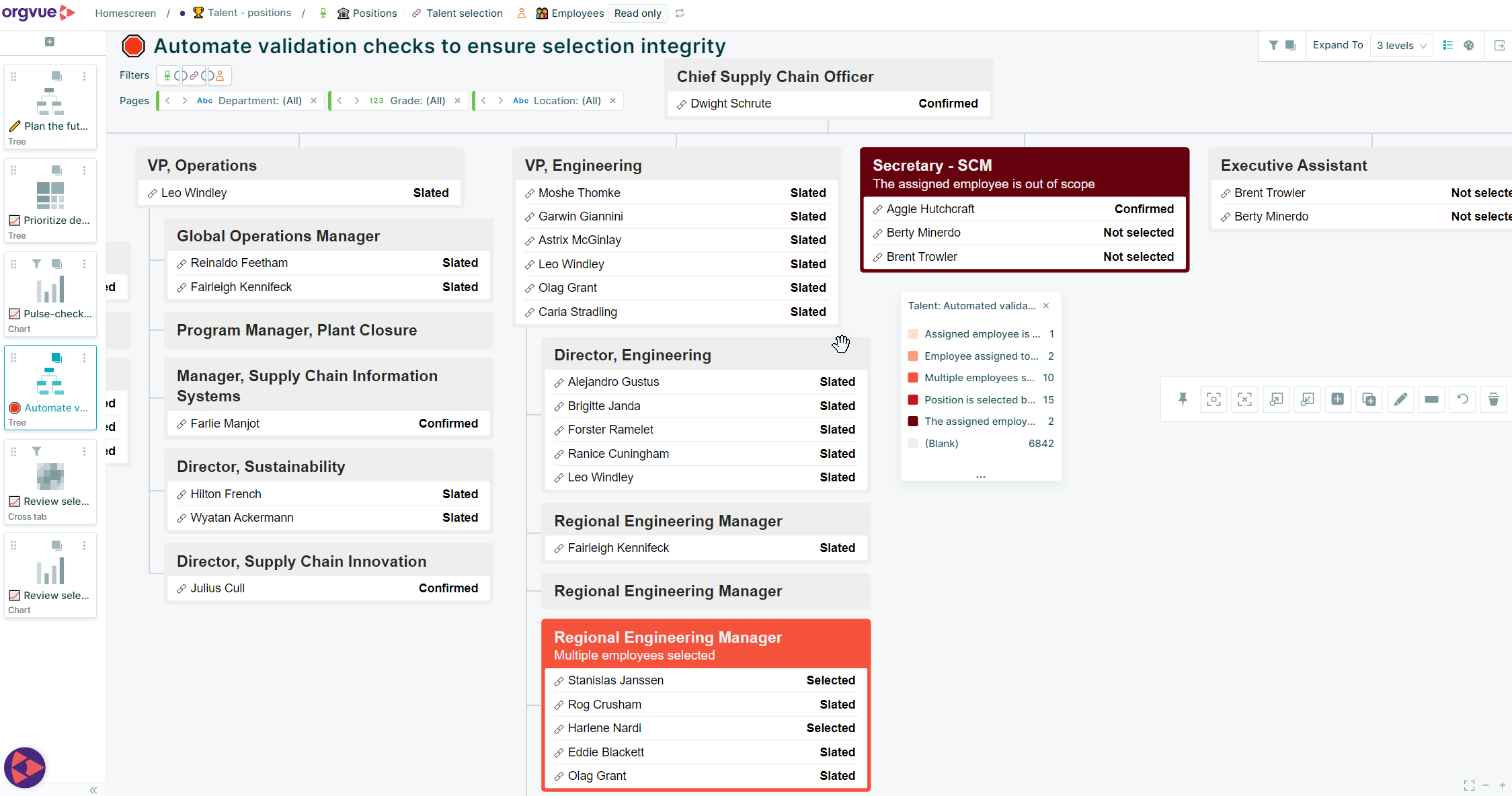
Showing positions in Orgvue with their different talent pools, whether candidates have been confirmed, selected, slated, or not selected
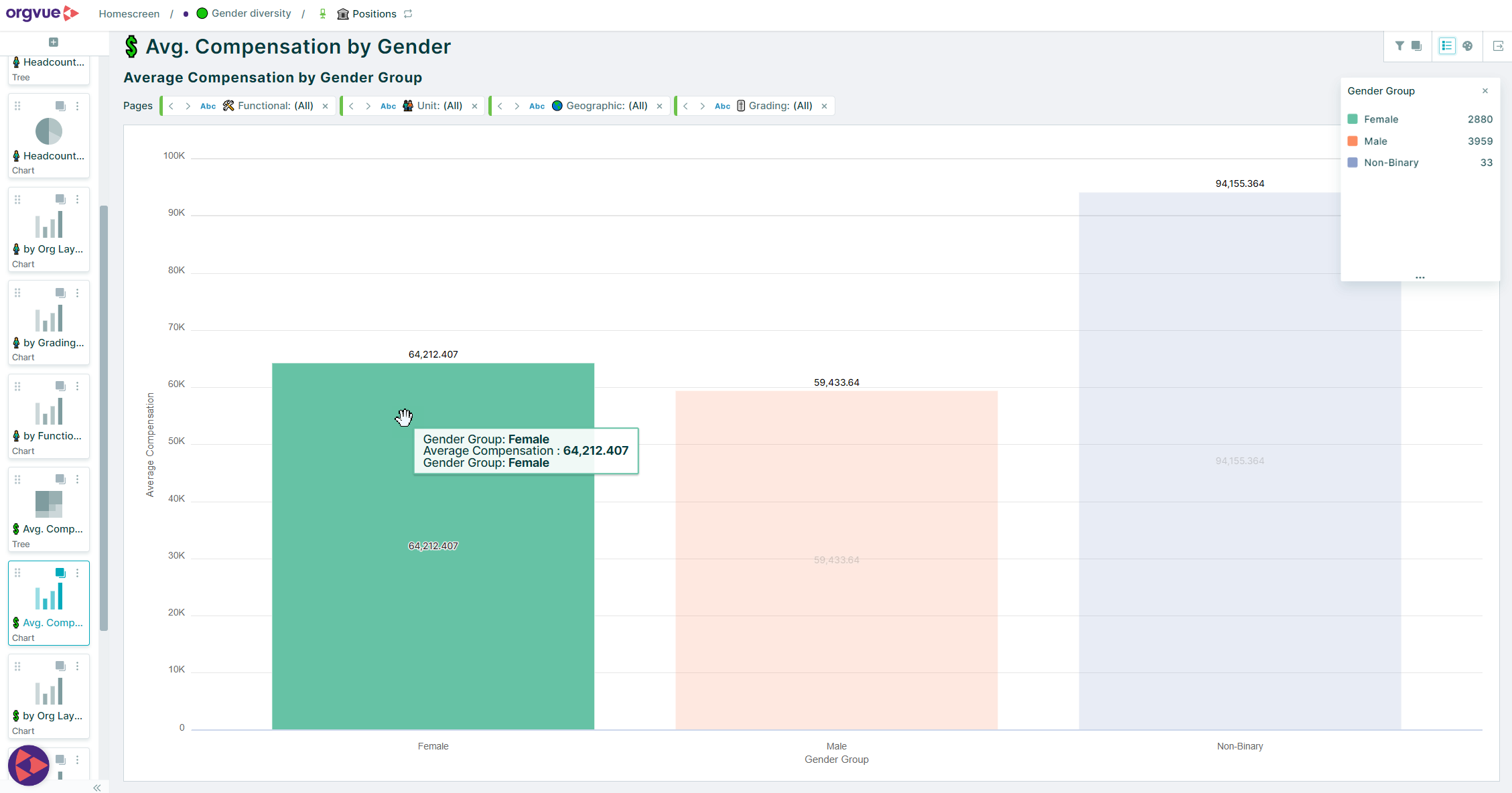
Using Orgvue to ensure changes haven’t impacted one gender more than another.
Review the impact of your decisions and execute your plan
To make sure you’re providing equal opportunity, you need to understand the composition of the workforce being impacted. Doing this will ensure you’re in line with your design principles in relation to culture, business objectives, financial planning, diversity and equal opportunity.
Customer story
A worldwide transition for a low-carbon future
50k
Employees
50,000 employees involved in global transformation.
6
Weeks instead of months
6 weeks instead of 6 months for the full workforce redesign.
300
Upskilled OD practitioners
300 upskilled Organizational Design practitioners in repeatable workforce planning.

Thanks to Orgvue, we managed to finalize this process in 6 weeks instead of 6 months.
VP of org design, oil and gas multinational
Business goal
- Move away from a traditional oil and gas operating model to a model focused on renewable sources
- Redesign more than 50,000 positions and undertake the full transformation quickly and at scale
Solution
- Created surveys to capture employee information such as activity and performance and linked the results to existing employee and position data in Orgvue
- Managed employee selection and transition, firstly for the organization’s top layers (1,000 employees), then for the entire company (50,000 positions)
- Trained and supported over 300 users to deliver repeatable workforce planning
Ready to see Orgvue in action?
In a personalized demo session, discover how Orgvue can help you:
- Understand workforce impacts before restructuring
- Compare multiple operating model scenarios
- Find critical skill gaps across the organization
- Align workforce plans to business strategy
- Accelerate AI workforce transformation
Trusted by global enterprises
“Orgvue’s automated role-clustering capability will save a huge amount of time in surfacing opportunities for organizational redesign, workforce planning, and cost reduction. What we’ve seen so far is truly game changing for design work.”
Stacy Anderson, Salesforce
Get your personalized demo
30-minute discovery call
Demo tailored to you
See our privacy notice. You can unsubscribe from marketing at any time by writing to us at [email protected].
Not ready for a demo? Explore more…



FAQ: Talent selection
Talent selection is the process of identifying, evaluating, and matching the most suitable employees or candidates to available roles based on business requirements, skills, experience, performance, location, and other workforce criteria. Effective talent selection helps organizations place the right people in the right positions.
Large-scale workforce transformations often involve changes to roles, structures, and operating models. Talent selection helps organizations identify which employees are best suited to future positions, reducing disruption and supporting a smoother transition to the target operating model.
Talent selection connects talent supply with workforce demand. By understanding available skills, workforce capacity, role requirements, and future workforce needs, organizations can make more informed decisions about placements, hiring, redeployment, and workforce restructuring.
Talent selection focuses on matching people to available roles during workforce changes, organizational redesign, or workforce planning initiatives. Succession planning focuses on preparing potential successors for future leadership or critical positions to ensure business continuity.
Organizations typically assess candidates using criteria such as skills, experience, qualifications, performance, competencies, career aspirations, location preferences, and workforce planning requirements. Combining these factors provides a more complete picture of role suitability.
Talent selection helps organizations identify employees whose skills and experience align with available opportunities elsewhere in the business. This supports internal mobility, improves employee development opportunities, and helps retain valuable talent.
By providing visibility into workforce composition and selection outcomes, talent selection processes can help organizations monitor impacts across different groups, promote fair decision-making, and ensure opportunities are distributed consistently with diversity and inclusion goals.
Talent pools are groups of employees or candidates who have been identified as suitable for current or future roles based on specific criteria. Creating talent pools helps organizations respond more quickly to workforce changes, recruitment needs, and organizational redesign initiatives.
Talent selection typically draws on workforce data such as skills, competencies, experience, performance, location, position data, organizational structure, workforce costs, and employee preferences. Bringing these data sources together helps improve talent decisions.
Orgvue brings together workforce, position, organizational, and financial data into a single platform, enabling organizations to visualize talent supply and demand, build talent pools, map people to positions, validate decisions, manage workforce transitions, and understand the workforce and financial impacts of talent selection decisions.