Workforce data harmonization
Unify your workforce data into a trusted baseline for better decisions
Trusted by global enterprises










Can you trust the data you rely on?
When your data sits in silos, it becomes almost impossible to understand your workforce or plan with confidence. Without harmonizing this data—cleaning, aligning, and structuring it into a single model—teams waste hours reconciling spreadsheets, struggle to trust the numbers, and risk making decisions on incomplete or conflicting information.
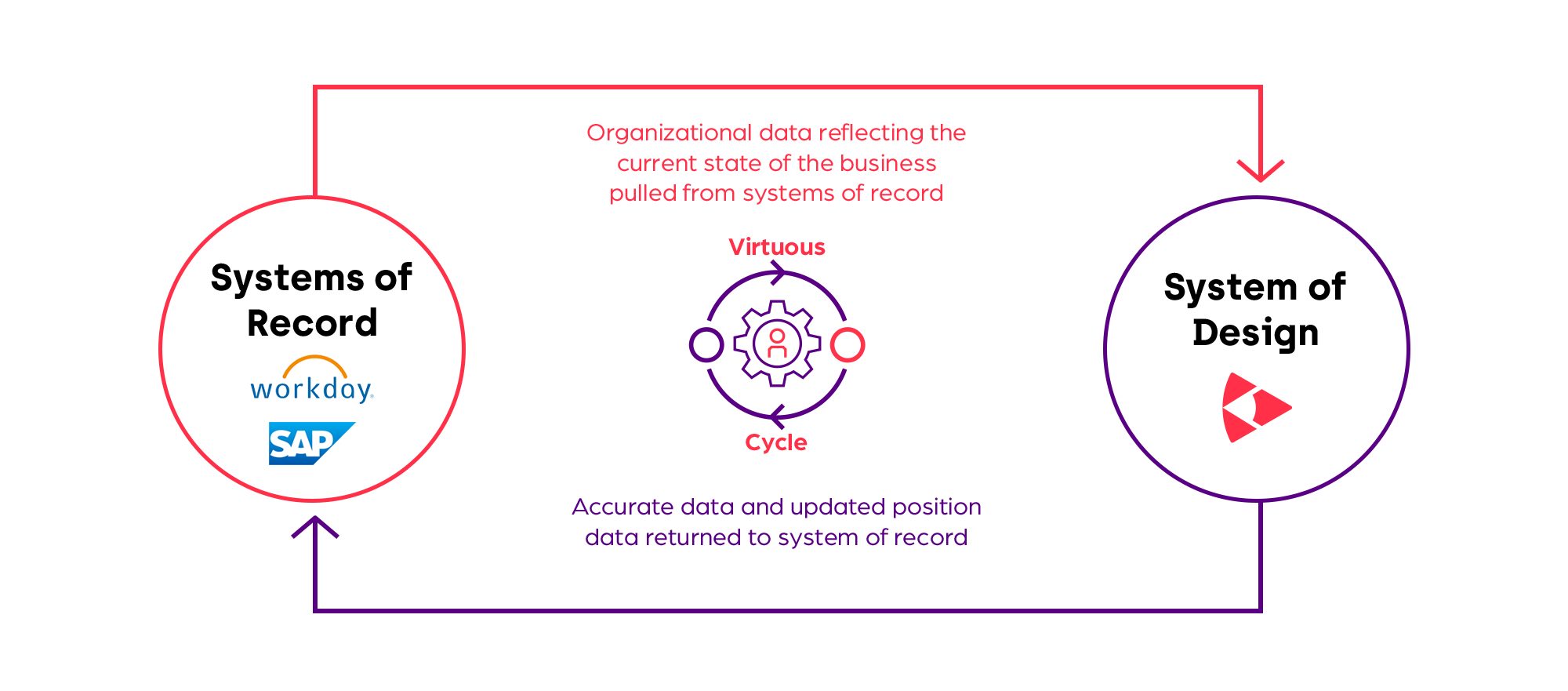
By directly connecting your systems of record to a system of design like Orgvue, you can simply build a trusted data foundation for analysis, scenario modeling, and ongoing workforce transformation.
Want to know more?
Before Orgvue, I used to receive 30 to 100 emails about innacurate data—whereas now I hardly receive any.
Head of Transformation
We made more than 150,000 changes to workforce data in 60 days. We could never have achieved that with our old methods using spreadsheets.
VP of Org Design
A clearer view of your organization
Orgvue brings your workforce data together into one connected platform, giving you a clear and consistent view of your organization. By harmonizing information from different systems (or even different organizations during M&A), Orgvue creates a single source of truth you can rely on to understand today’s reality and design what comes next. Orgvue’s data integration capabilities also remove the burden of manual transfers by building automated transfer between your systems, keeping your data accurate and available whenever you need it.
When you need a broader perspective, Orgvue can also enrich your internal data with external talent intelligence, helping you understand roles and skills in a wider context.
Orgvue’s Jayne Clarke joins Deloitte’s Jesse Jacks and Dan Sundt to explore how automated connectors support digital twins
Your digital twin, brought to life
With harmonized data in place, you now have a trusted digital twin of your organization in Orgvue. This living model lets you explore scenarios, test different design options, and understand the impact of change before anything shifts in reality. It’s a safe, controlled environment for confident, future-focused decision-making.
features and benefits
How Orgvue helps
1
Bring your data together
Easily integrate data from HR, finance, and planning systems in the way that suits your business. Orgvue supports:
- Direct connectors for platforms like Workday and SAP SuccessFactors
- Custom API connectors tailored by our engineering team and partners
- CSV and spreadsheet transfers via manual or scheduled uploads
- Built-in surveys for direct input from leaders
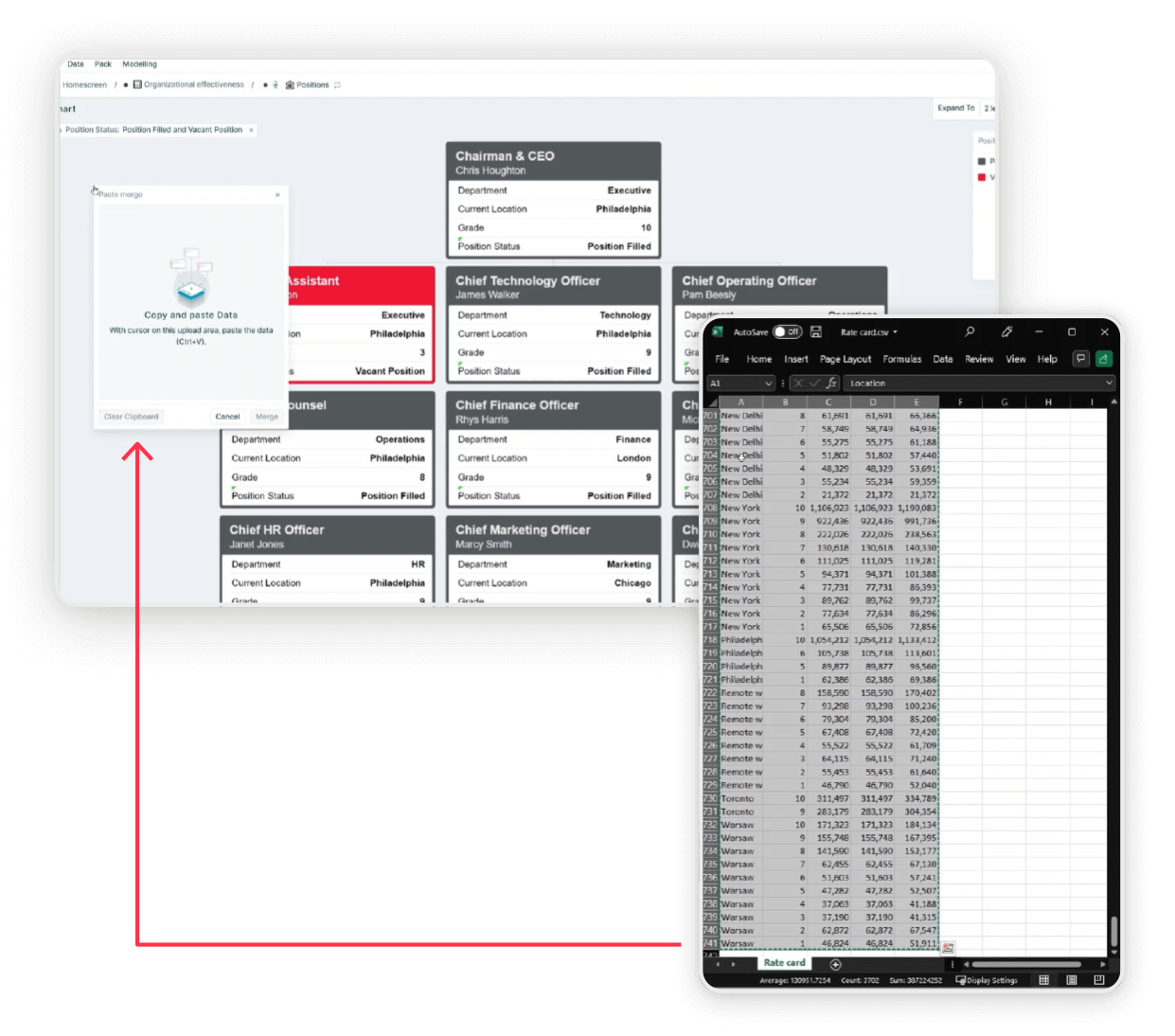
Copy and pasting rate card data from spreadsheets into Orgvue
2
Build a clean foundation
As you start visualizing your data in Orgvue, inconsistencies often surface when information comes from multiple sources. Orgvue’s drag-and-drop tools help you quickly bring order to that complexity, making it easy to align fields, standardize labels, and create a clean, consistent foundation you can trust for design and planning.
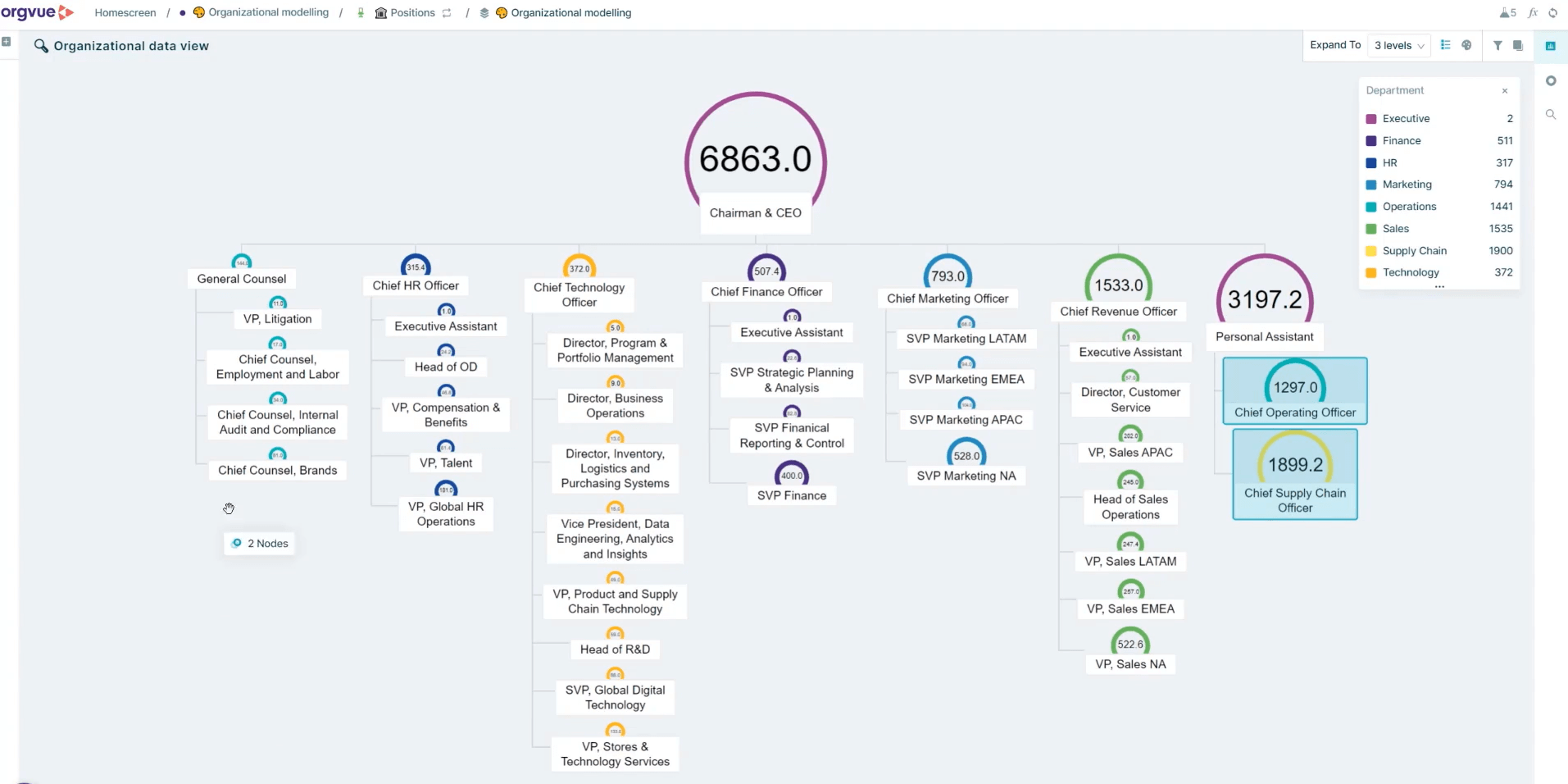
Identifying inconsistencies in reporting lines
3
Understand organizational performance at a glance
Once your data is loaded and harmonized, Orgvue’s visualizations help you understand how your organization is really performing. You can quickly explore areas such as organizational effectiveness, diversity metrics, spans and layers, critical roles and skills, and retirement risk to surface insights, identify risk, and focus attention where it matters most.
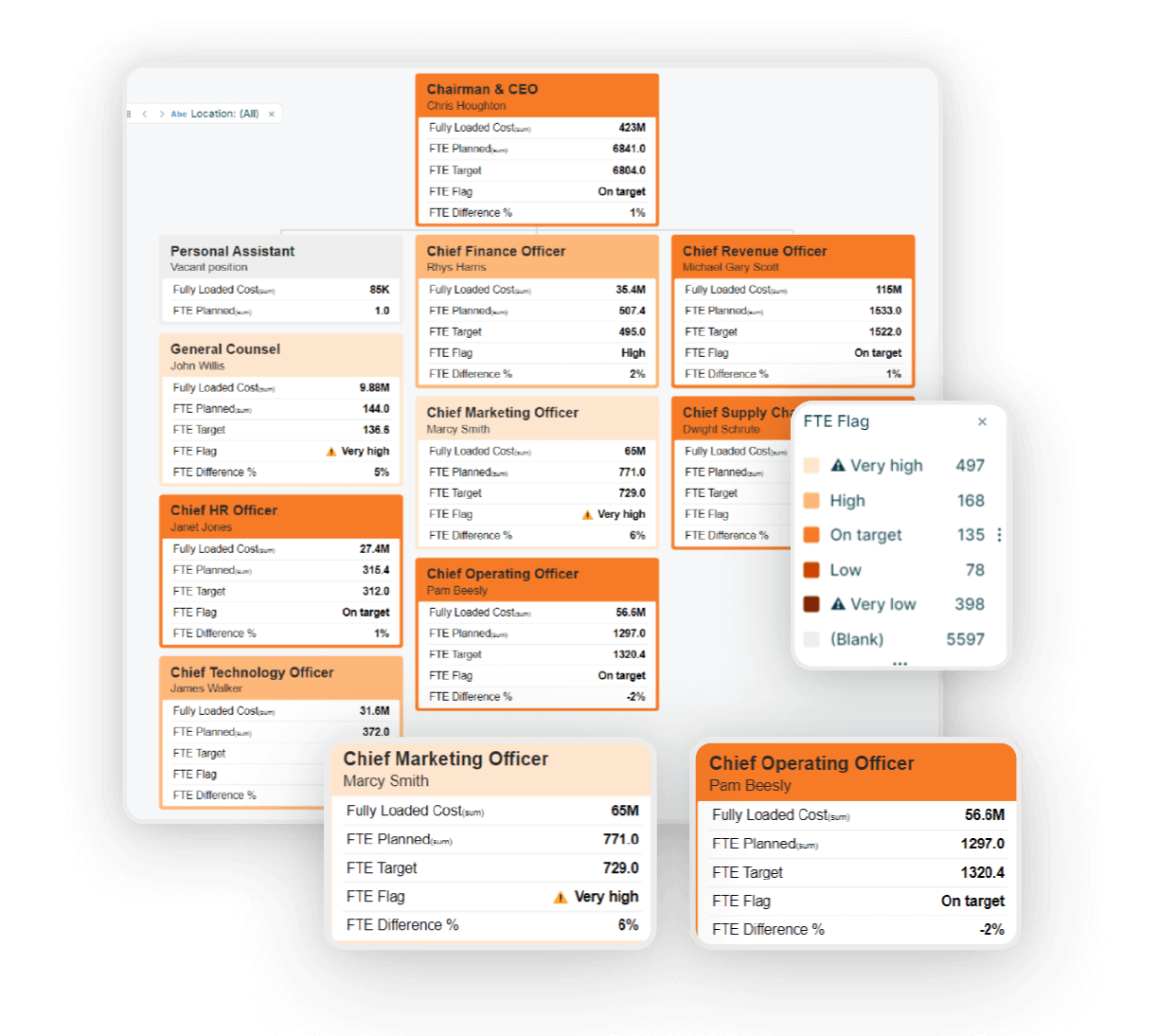
Visualizing the budget summary for each department, with full FTE visibility

Henshaw CLEANER
Build a trusted workforce data foundation for transformation
Clean and standardize workforce data faster with context-aware AI recommendations, explainable suggestions, and human review built directly into Orgvue.
Use AI to:
- Spot inconsistent workforce data
- Understand why changes are recommended
- Review and approve updates with confidence
- Build trust in data-driven workforce decisions
Common use cases
Automating data flow between Orgvue and systems of record will benefit in a number of ways. Explore the following scenarios where such connectors deliver value:

Workforce tracking
- See workforce trends and monthly changes easily
- Check progress on planned changes and the impact of unplanned change

Total cost of workforce
- Aggregate labor cost and headcount data from multiple sources
- Provide up to the minute and reliable reports on costs and movements in the workforce
Workforce planning
- Download skills data and align to external labor market information
- Analyze where skills gaps exist now and into the future
- Feed plans back to HR suite for recruitment, talent development, and retention
Ready to see Orgvue in action?
In a personalized demo session, discover how Orgvue can help you:
- Understand workforce impacts before restructuring
- Compare multiple operating model scenarios
- Find critical skill gaps across the organization
- Align workforce plans to business strategy
- Accelerate AI workforce transformation
Trusted by global enterprises
“Orgvue’s automated role-clustering capability will save a huge amount of time in surfacing opportunities for organizational redesign, workforce planning, and cost reduction. What we’ve seen so far is truly game changing for design work.”
Stacy Anderson, Salesforce
Get your personalized demo
30-minute discovery call
Demo tailored to you
See our privacy notice. You can unsubscribe from marketing at any time by writing to us at [email protected].
Not ready for a demo? Explore more…




FAQ: Data harmonization
Data harmonization is the process of cleaning, aligning, and structuring workforce data from different sources into a single, consistent model. This creates a trusted baseline you can use to understand your organization today and confidently plan for the future.
Workforce data harmonization creates a consistent, trusted view of your workforce by bringing together data from HR, finance, planning, and operational systems. It helps eliminate conflicting reports, reduce manual reconciliation work, and improve confidence in workforce planning, organizational design, and business decisions.
Data harmonization focuses on cleaning, standardizing, and aligning data so it can be meaningfully analyzed and modeled. Data integration focuses on how data is transferred into and out of Orgvue, whether through automated connectors, APIs, file uploads, or surveys. Many organizations start with harmonization and add integration as their needs mature. Orgvue data integration partners like Deloitte, Preos and Geconex.
Organizations often struggle with inconsistent job titles, missing data, duplicate records, misaligned reporting structures, outdated organizational information, and conflicting definitions across systems. Data harmonization helps standardize and clean workforce data so leaders can make decisions with greater confidence.
An organizational digital twin is a living digital representation of an organization’s workforce, structure, positions, costs, skills, and reporting relationships. Built on harmonized data, it allows leaders to model scenarios, test organizational changes, and understand potential impacts before implementing decisions in the real world.
Orgvue can harmonize a wide range of workforce data, including people, roles, skills, costs, reporting lines, locations, and diversity metrics. This data can come from across HR, finance, and planning systems, as well as from databases, files, SaaS applications, web services, legacy systems, and custom applications. Orgvue also supports bringing together data from different organizations, such as during mergers and acquisitions.
Organizations use data harmonization in Orgvue to create a reliable, consistent foundation for understanding how their workforce operates today. By bringing data together from across systems and aligning it into a single model, teams can move beyond fragmented reporting and gain confidence in the information they rely on. This clarity is essential for answering fundamental questions about headcount, cost, structure, roles, skills, and organizational effectiveness.
With a trusted baseline in place, data harmonization supports a wide range of workforce planning and transformation activities. Organizations use it to analyze spans and layers, assess diversity and inclusion metrics, identify critical roles and skills, understand cost drivers, and surface risks such as retirement exposure or capability gaps. It is also commonly used to support mergers and acquisitions, where data from multiple organizations needs to be aligned quickly to understand overlaps, differences, and future design options.
Beyond analysis, harmonized data in Orgvue enables more confident decision-making over time. It underpins scenario modeling, organizational design, and strategic workforce planning by ensuring that decisions are based on a consistent view of the organization. Whether supporting large transformation programs or more targeted initiatives, data harmonization helps teams reduce risk, move faster, and focus on designing what comes next rather than reconciling data.
Yes. Workforce data harmonization helps organizations combine data from multiple companies, systems, and structures into a unified workforce model. This makes it easier to assess workforce overlap, identify organizational risks, compare structures, and support post-merger integration planning.
Workforce planning depends on accurate and consistent workforce data. By harmonizing information from multiple systems, organizations can establish a reliable baseline for forecasting headcount, analyzing skills gaps, modeling future scenarios, tracking workforce costs, and aligning workforce plans with business strategy.
Orgvue is delivered as a Software as a Service (SaaS) platform, with security and data privacy built in by design. All customers benefit from consistent security controls, data management policies, and service-level commitments across the platform. Orgvue follows recognized industry standards and best practices to protect customer data throughout ingestion, harmonization, analysis, and modeling.
Orgvue’s security and privacy approach includes:
Independent assurance and certifications
Annual SOC 2 Type II report
ISO 27001, ISO 27018, and CSA STAR certifications
Penetration testing performed at least annually
Strong access controls and data separation
Customer data is logically separated by tenant
Each tenant is encrypted using a dedicated encryption key
Orgvue employees do not have access to customer data by default
Role-based access control (RBAC) and single sign-on (SSO) are supported
Robust data protection and compliance
Data encrypted at rest using AES-256 encryption
Compliance with international data protection legislation
Standard Data Processing Agreement available
Flexible and secure hosting options
Data hosted on AWS in multiple regions, including the United States, Europe, and Australia
Comprehensive and up-to-date information about Orgvue’s security practices is available through the Orgvue Trust Center.