Build repeated roles faster with multi-node creation
Orgvue product update
Organization designs often need several positions with the same starting details. You can now create those nodes together instead of repeating the same action one at a time.
In the Create node window, use Create multiple nodes to specify how many identical nodes you need. Orgvue adds them to the structure in a single action.
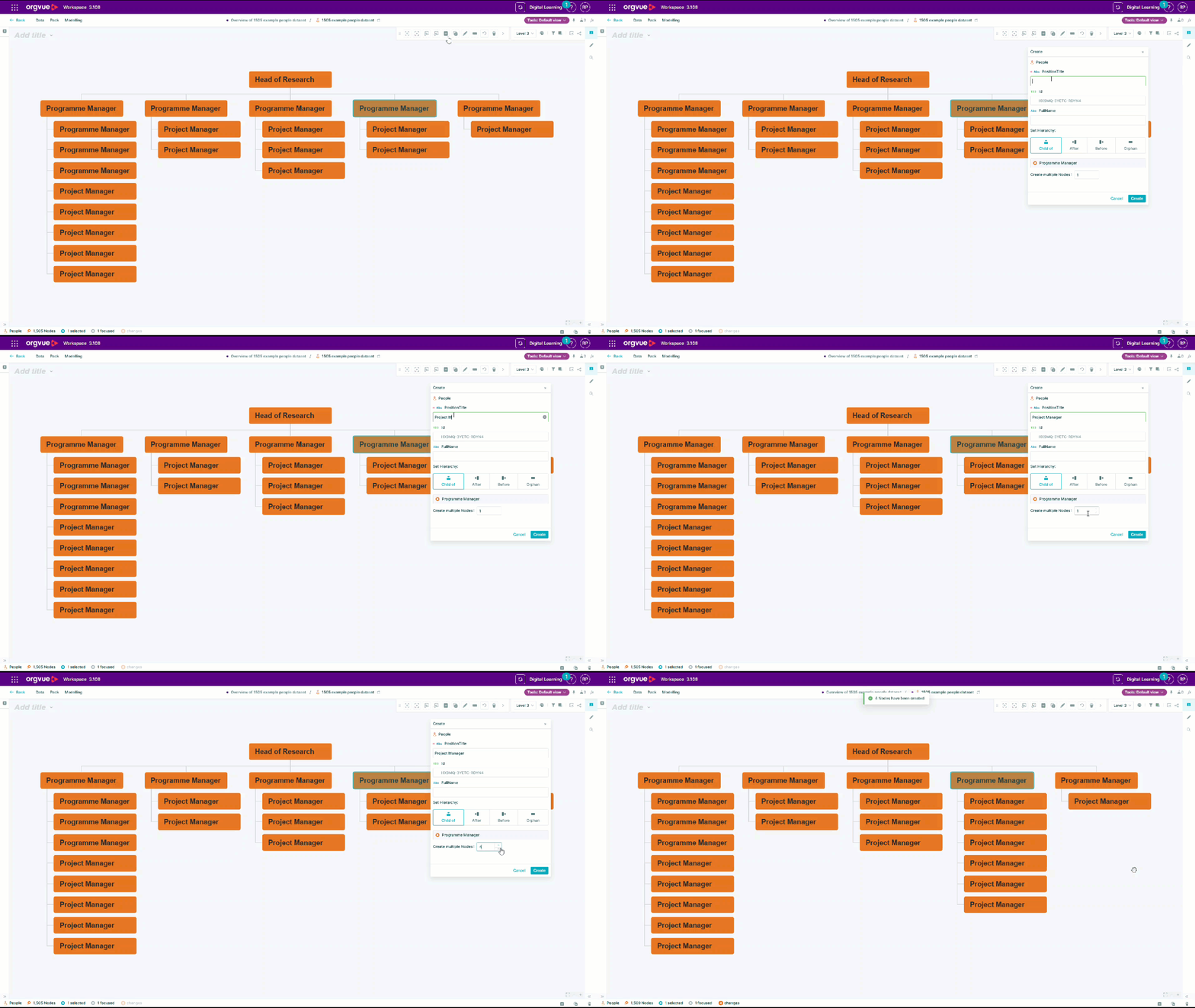
This saves time when modeling teams with repeated roles, adding a group of vacancies or building a future-state structure that includes several equivalent positions. It also reduces the risk of small inconsistencies caused by entering the same starting information repeatedly.
Once the nodes are created, you can continue shaping the structure and adjust individual details where needed. The result is a faster starting point for common organization design tasks, while keeping the flexibility to refine each position afterward.
Explore the Orgvue platform
FAQ: Multi-node creation
Yes. In the Create node window, choose Create multiple nodes and specify how many identical nodes you want to add.
It is useful for modeling repeated roles, adding a group of vacancies or creating several equivalent positions in a future-state structure.
Yes. The nodes share the same starting details, and you can adjust individual properties afterward as you continue shaping the structure.