We noticed that you were redirected here from the Dynaplan website Dynaplan has recently become part of Orgvue. Click Login to access your Dynaplan account.
Workforce planning can no longer start and stop with headcount. As AI changes how work gets done, leaders need to understand how tasks will change and then use that insight to plan how to transform the workforce.
That’s why a work-first approach to planning matters. Orgvue’s Activity Analysis helps reveal:
The activities people actually perform
Where time and cost are being consumed
Where AI, automation or redesign could create capacity
Those insights then feed directly into Work Redesign, transforming analysis into actionable future workforce plans. By connecting evolving activities to workforce demand, skills, roles, positions, and costs, Orgvue enables organizations to plan based on evidence and reality, rather than assumptions.
Organizations that redesign work around AI are reported to be 2.5x more likely to achieve superior outcomes
Orgvue is built for that reality. Our flexible workforce planning portfolio brings connected platform capabilities together, giving organizations a modern workforce planning tool that can evolve as their needs mature.
Flexible portfolio plus advisory and services capability transfer
Meeting you where you are
No two workforce planning journeys are the same.
Some organizations are establishing workforce planning for the first time. Others are extending mature planning capabilities across business units. Others are redesigning work in response to AI.
Orgvue adapts to the way your organization plans today, combining the flexibility of a workforce planning tool with the governance needed for long-term success. It helps you build toward a more continuous, governed capability over time. You can start with a focused planning challenge and build capability at your own pace.
Typical starting points
Building foundations: data preparation, workforce visibility and job architecture
Planning for growth: demand forecasting, workforce supply and skills planning
Driving transformation: work redesign, scenario modelling and operating model change
Connecting headcount, cost, capacity and budget to better align HR and Finance
Take the workforce planning maturity assessment
In just two minutes, see where your organization sits today and how Orgvue can help.
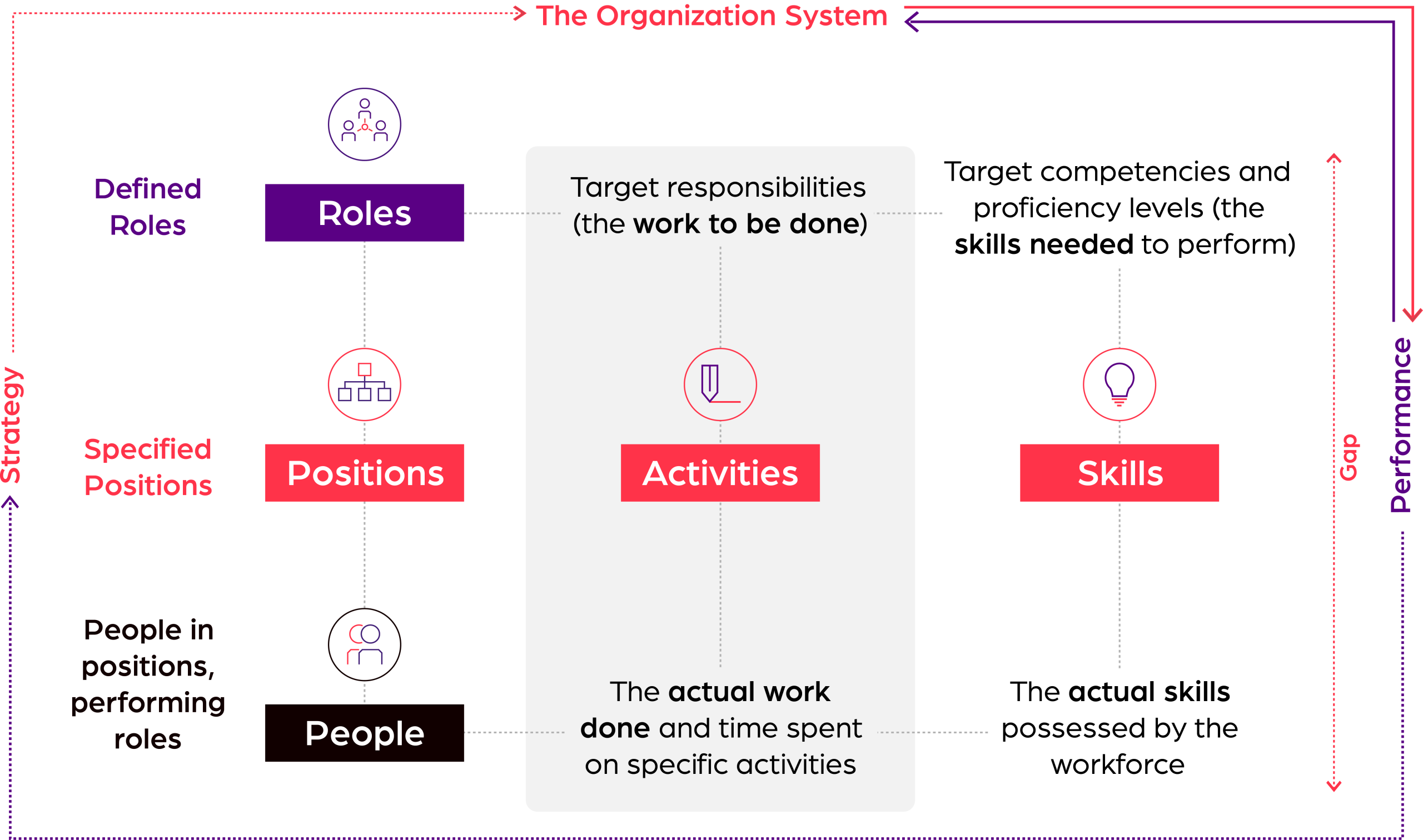
The Organization System: one foundation for every workforce decision
Most planning approaches force organizations to work in narrow silos, headcount, cost, skills or work in isolation.
Orgvue is different because it can connect these elements in one governed Organization System for strategic workforce planning—linking work, skills, roles, positions and people in a single planning platform—while still giving you the flexibility to start with the data and planning challenge that matters most today.
You can model the whole organization as a connected system or focus on one area first. Over time, the connected system becomes the foundation for more advanced workforce planning. You can build better scenarios, govern decisions more effectively and respond faster as workforce requirements and availability change.
Diagram showing the flow of the Organization System
Technology plus expertise to build capability
Workforce planning is a capability, not a one-time implementation.
Orgvue combines a flexible workforce planning platform with the expertise of organization design, workforce planning, and transformation specialists who help you identify the right starting point, define a practical roadmap, and build capability over time.
What Professional Services help you achieve
Define the right starting point for your planning goals
Map the pathway from current maturity to continuous planning
Configure Orgvue around your data, process and operating model
Support work redesign, organization design and workforce transformation
Transfer capability so your teams can plan with confidence
The goal is straightforward: empower your teams with the skills, confidence, and processes needed to plan continuously as work, business priorities, and workforce demands evolve.
Orgvue gave us more than a platform. Their experts helped us shape the approach, build internal capability and turn workforce planning into something we can run ourselves.
Orgvue customer
Real results from AI-powered workforce planning
50%
Faster modeling across 120 countries
Shifted to continuous organization design at global scale, cutting modeling time by 50% and integrating data from multiple sources to speed decisions across 16 regions and 11 functions.
Unlocked savings by merging data from over 30 systems, building a unified view of workforce cost and supply, and using scenario modeling to pinpoint optimization opportunities.
Using Orgvue’s Henshaw AI, replaced six months of manual role mapping with six days of AI-powered analysis, organizing 8,000 positions into 83 clusters to unlock workforce planning.
Turn workforce planning into a continuous capability
1
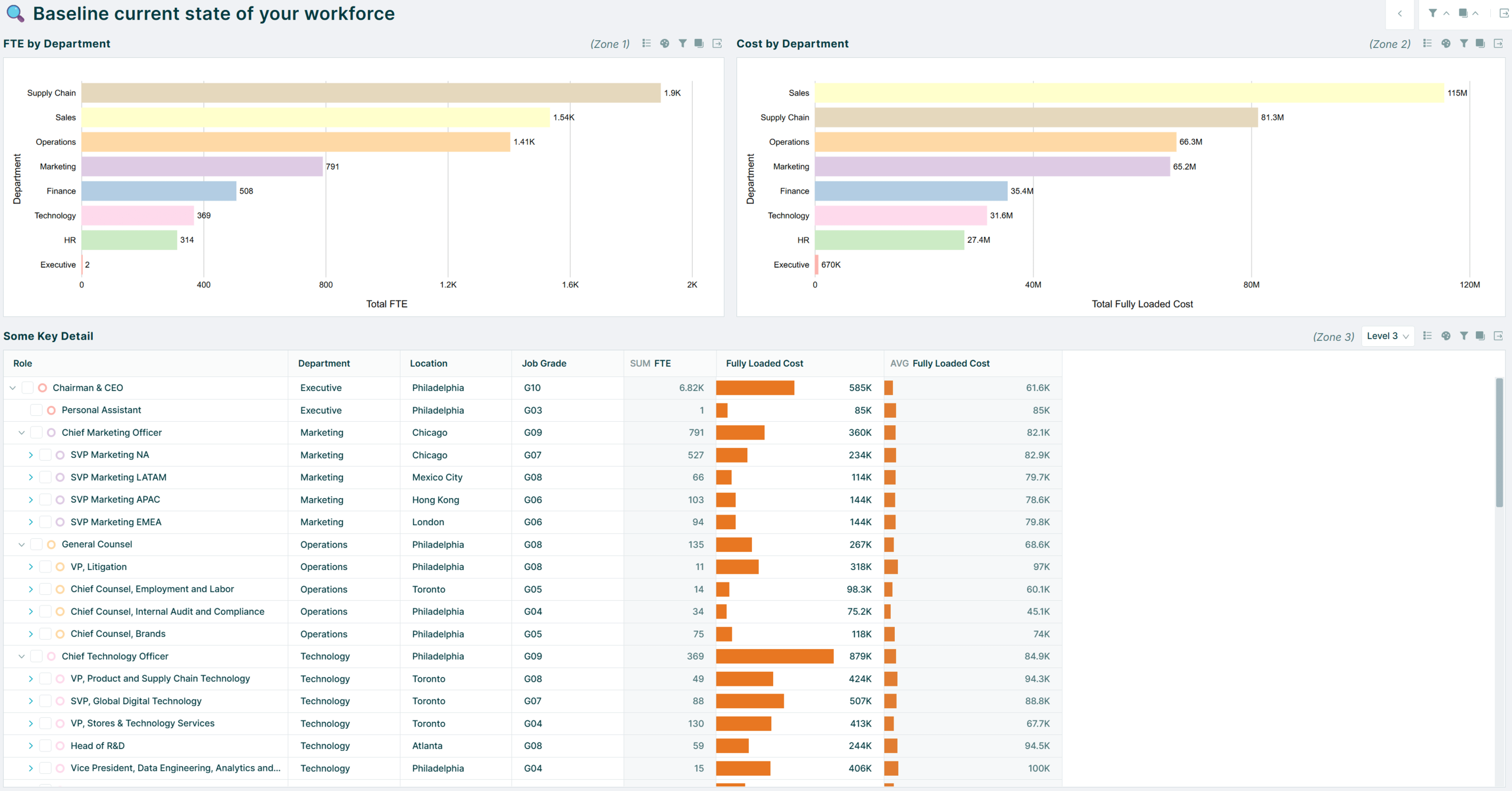
Build a trusted planning baseline
Bring internal and external workforce data into a single planning foundation. Segment the workforce by role, job family, level, location, function or other planning dimensions so leaders can see where they are today.
Answer questions such as:
Can I aggregate all my positions into role families for better planning at a strategic level?
How is my workforce and cost base distributed today?
How do open positions impact the current structure and workforce?
AI tip: Use Henshaw Roles AI to aggregate positions into foundational role architecture in minutes.
Analyze current cost & headcount and identify appropriate role groupings to build a baseline
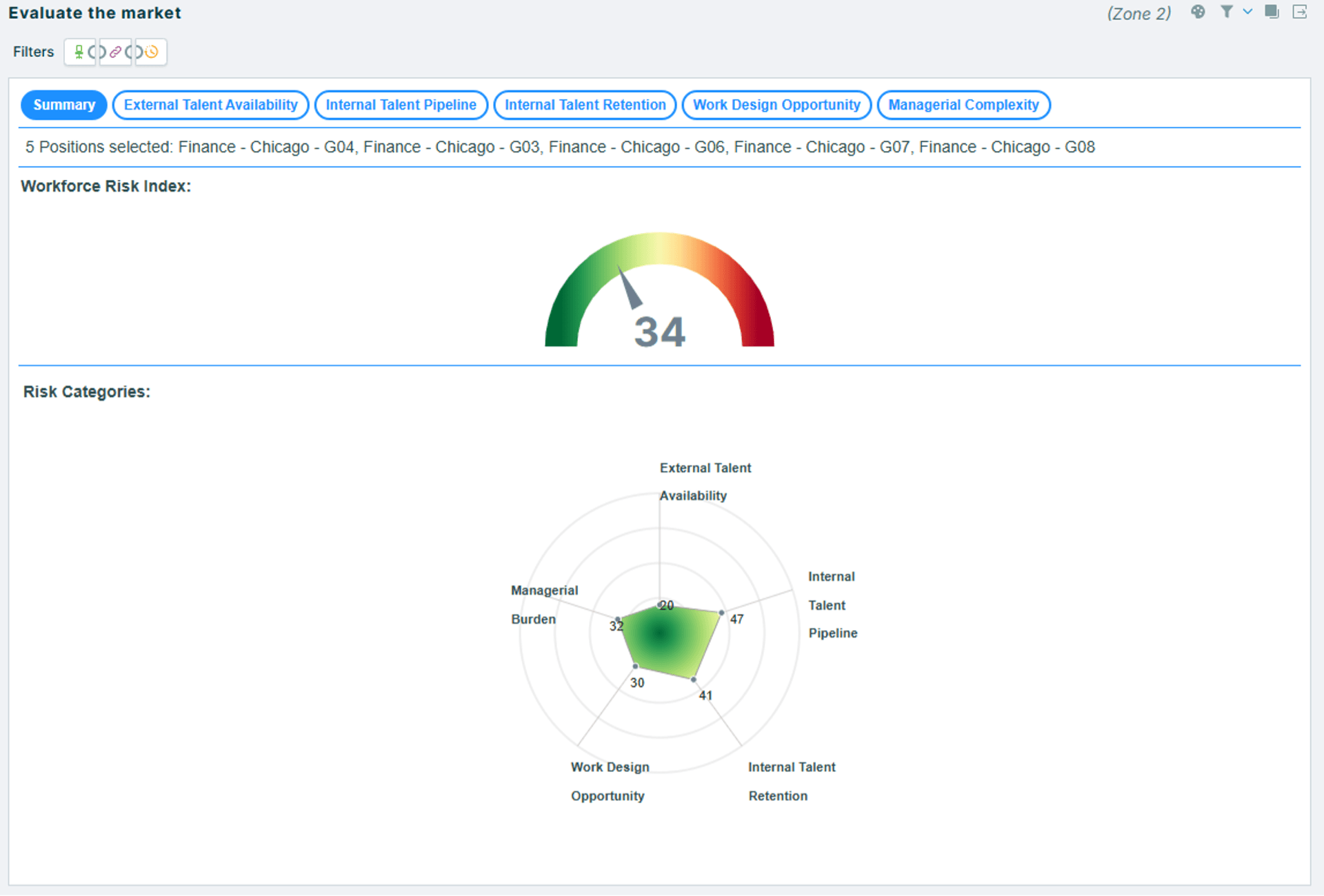
Identify the workforce risk and opportunity using both internal and external labor market data
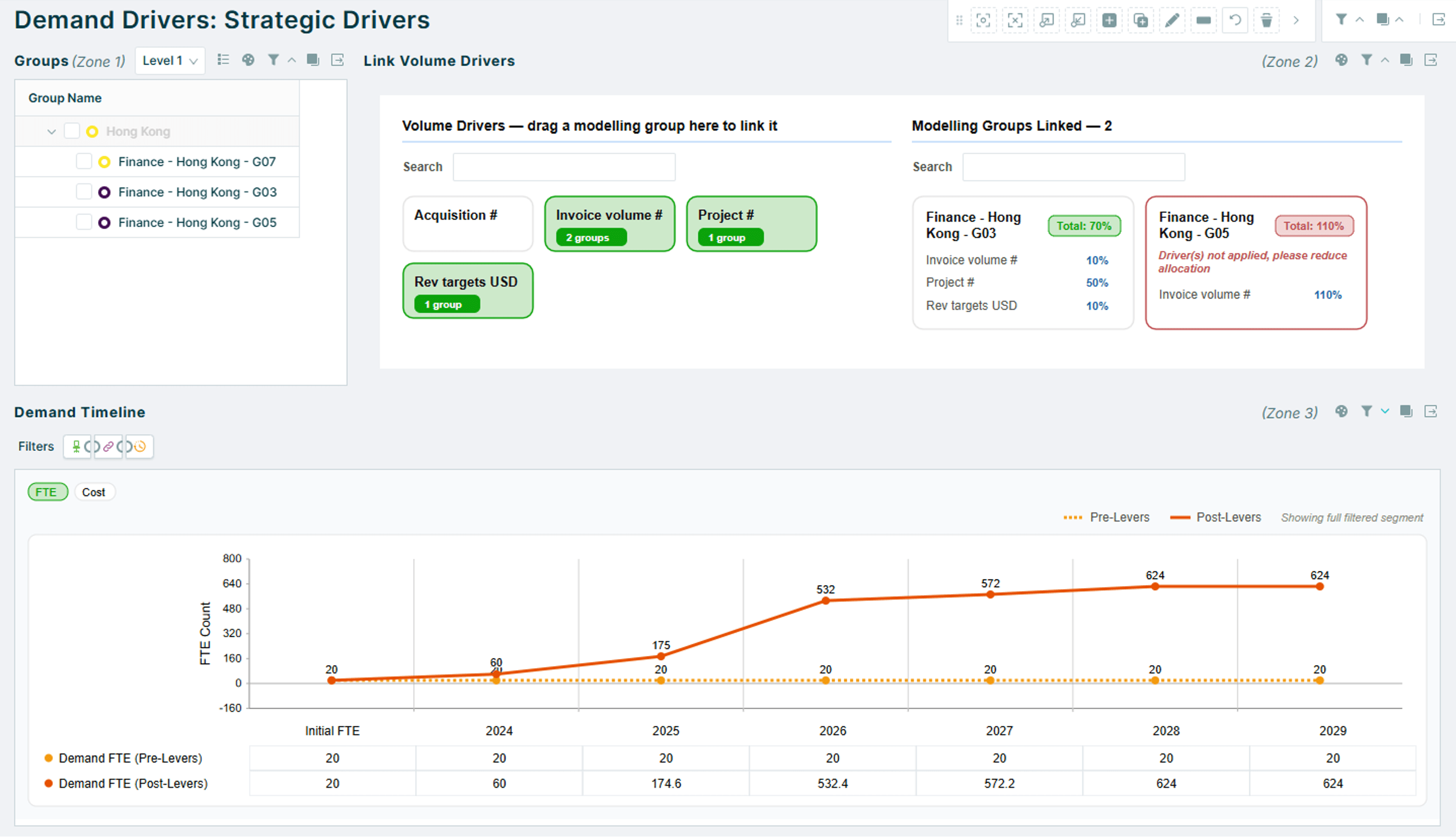
Map strategic drivers & work activities to workforce segments to determine and refine demand forecasts
2
Understand work and future demand
Analyze the work that needs to be done to deliver business strategy. Understand how demand changes over time and how AI, automation, growth or transformation initiatives will change work, redesign roles and processes.
Answer questions such as:
What work needs to be done to meet business objectives / support strategy?
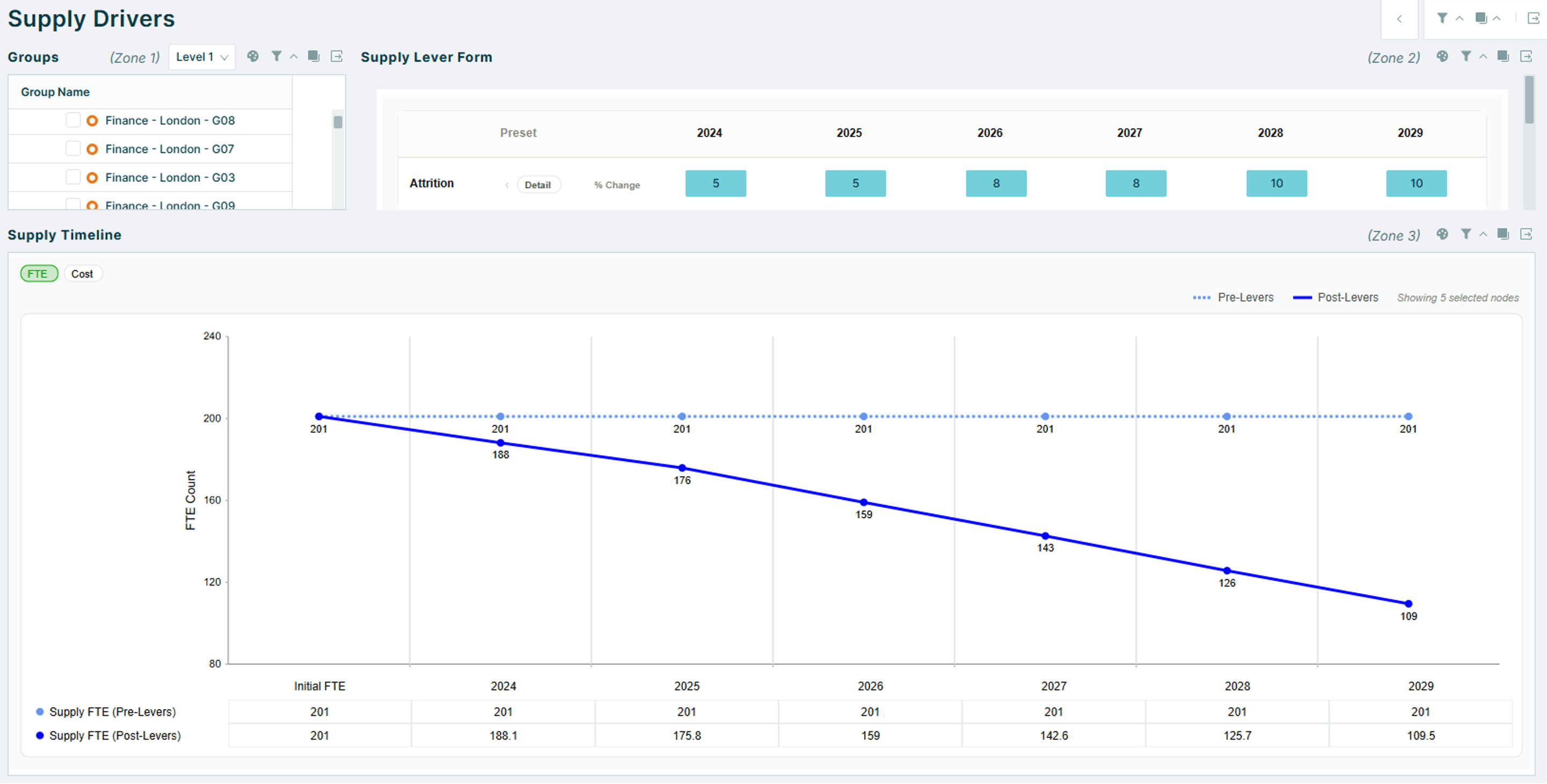
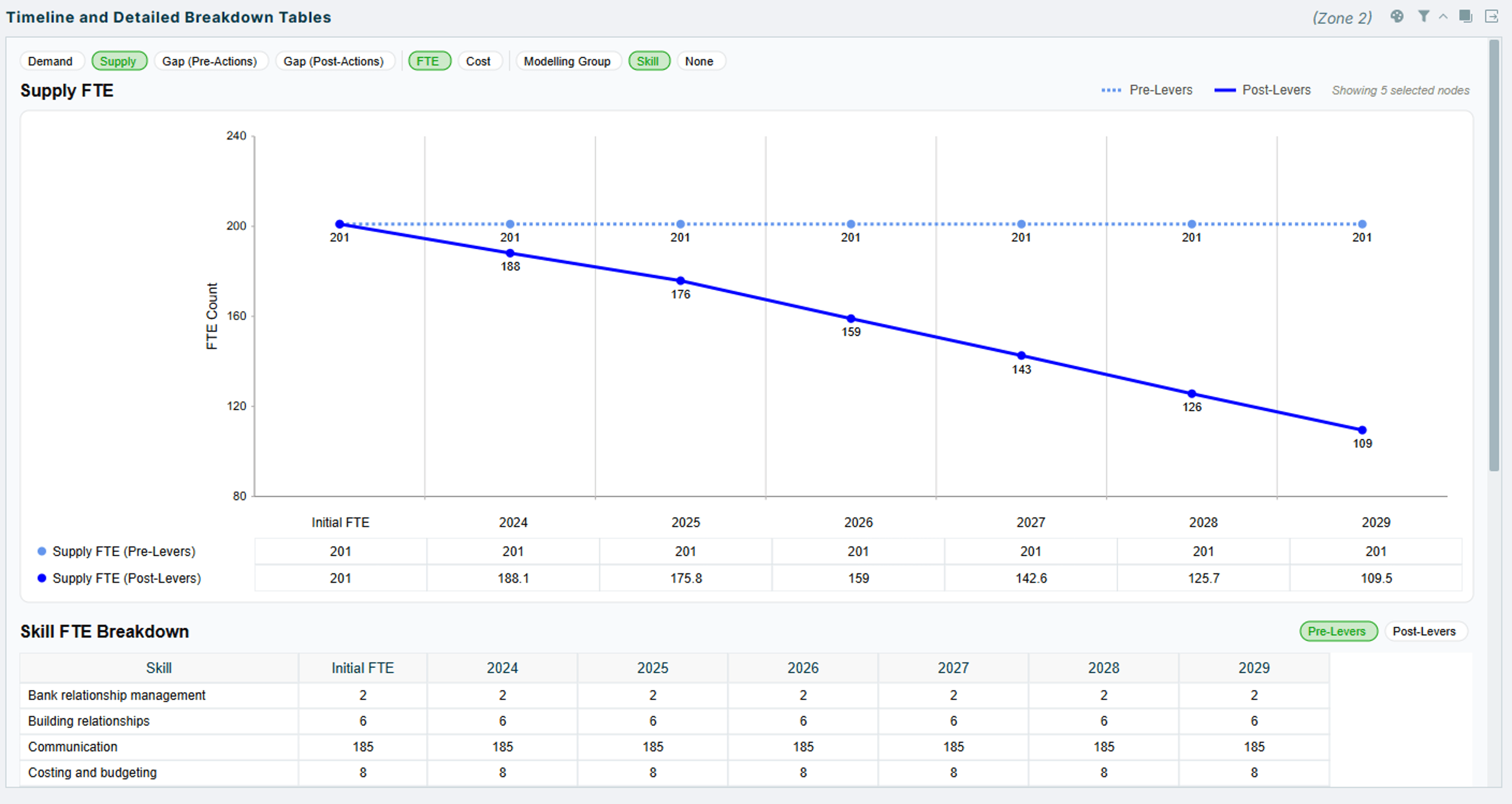
Forecast future workforce supply, considering drivers such as attrition and retirement. Identify capacity, skills, and cost gaps, then test options to close them.
Answer questions such as:
How does workforce capacity evolve over time?
Which critical skills are at risk due to the loss of key employees?
How will workforce demographics change over the planning horizon?
Model assumptions for future workforce supply, such as retirement and attrition
Review supply output and assess impacts on critical skills
Model gap closing actions and identify impacts
Identify similar role clusters based on target skill profiles to build talent pools or career paths
4
Analyze gaps and scenario-plan workforce decisions
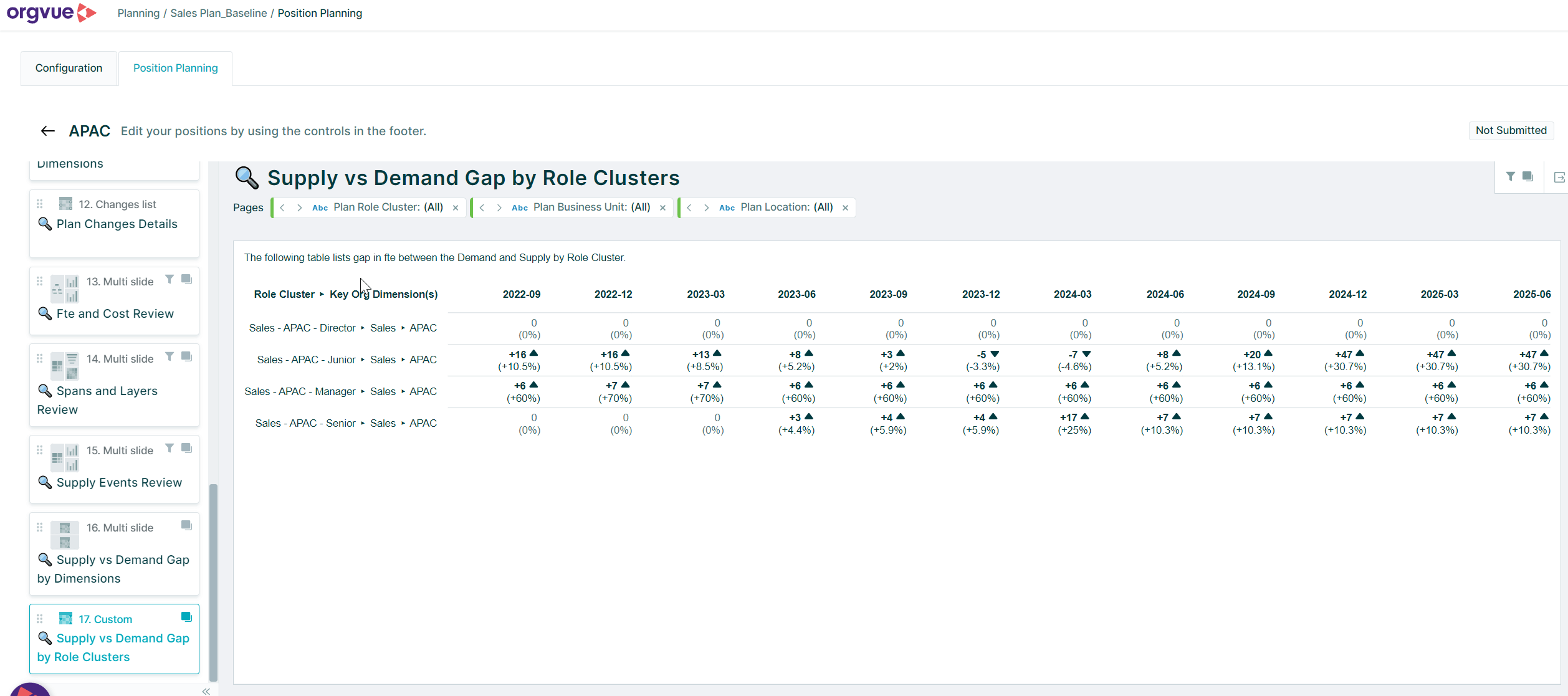
Create and compare different scenarios to close gaps using measures such as build, buy, borrow, bot. Understand the impact on people, roles, cost and business priorities before decisions are made.
Answer questions such as:
Which workforce segments are expected to face critical deficits or surpluses, and what is driving them?
Which skills will be in greatest shortage?
What is the most effective and efficient way to close workforce and skill gaps?
5
Execute, track and adapt
Translate plans into action, monitor progress against workforce and business targets, understand what is causing shifts month over month and course-correct as assumptions change. Move from episodic planning projects to continuous workforce planning.
Answer questions such as:
Where is most change happening?
How is internal mobility or new recruiting affecting the plan?
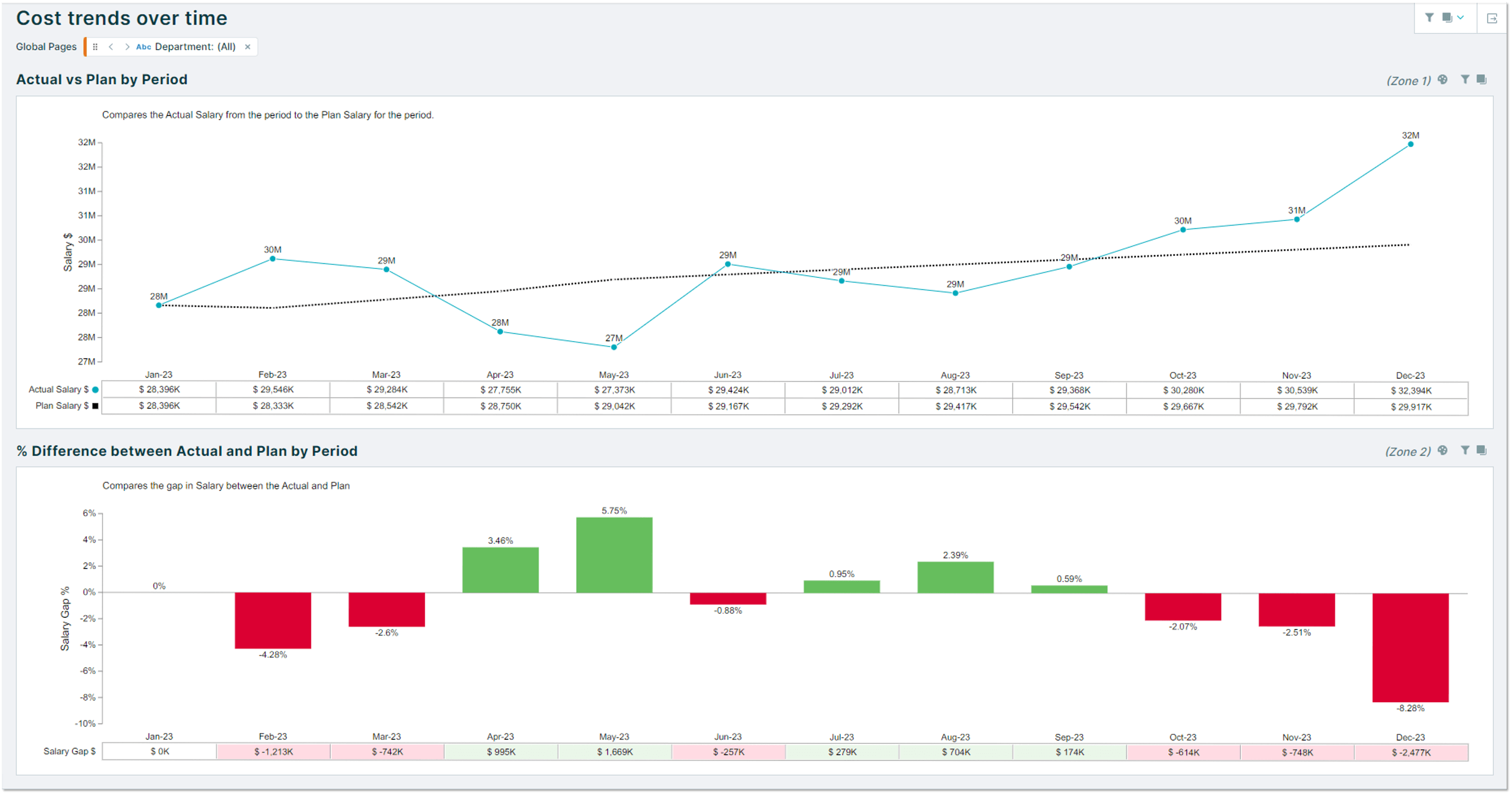
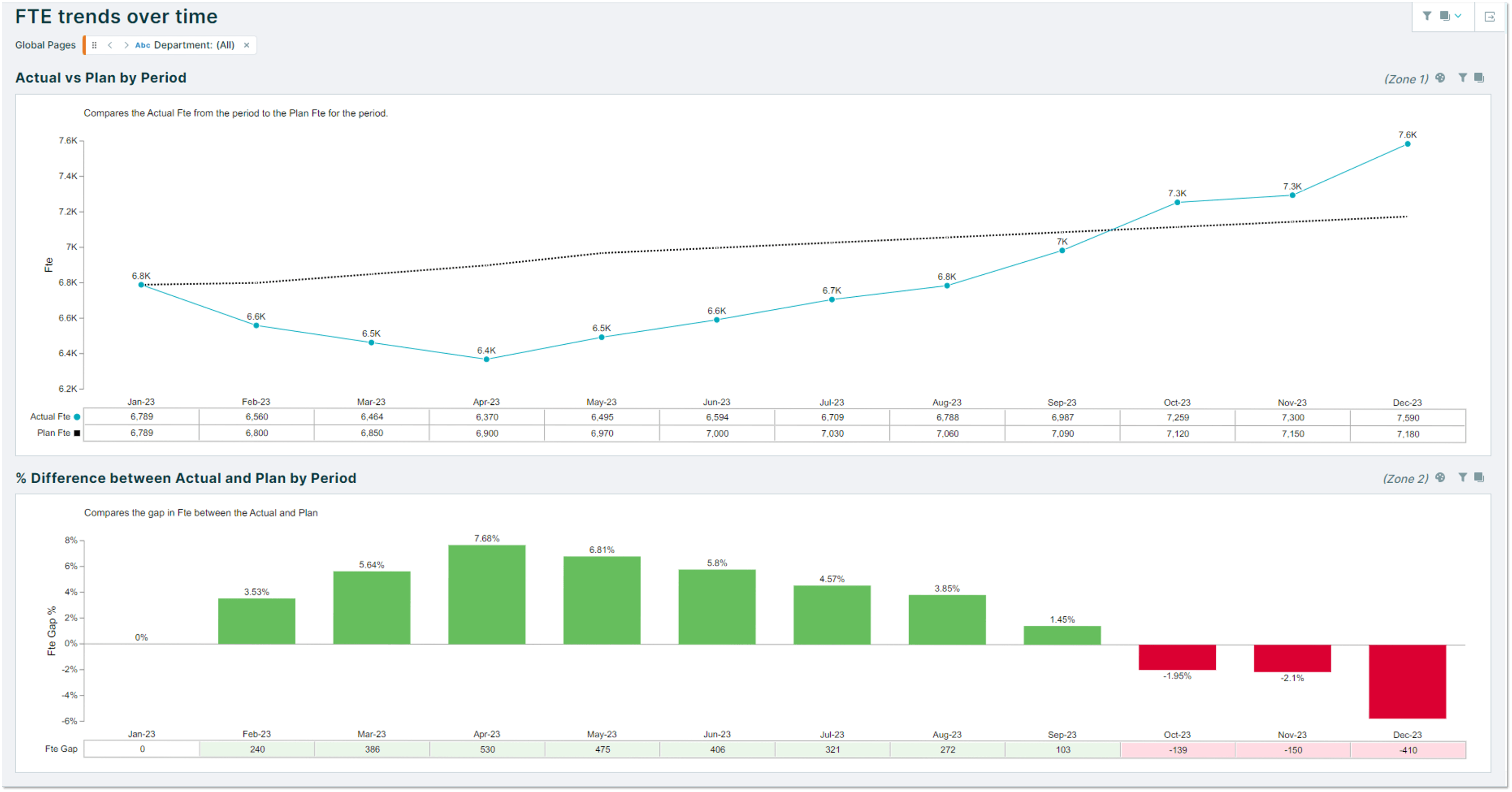
What does the monthly breakdown look like against budget?
Understand FTE and budget trends over time
Ready to see Orgvue in action?
In a personalized demo session, discover how Orgvue can help you:
Understand workforce impacts before restructuring
Compare multiple operating model scenarios
Find critical skill gaps across the organization
Align workforce plans to business strategy
Accelerate AI workforce transformation
Trusted by global enterprises
“Orgvue’s automated role-clustering capability will save a huge amount of time in surfacing opportunities for organizational redesign, workforce planning, and cost reduction. What we’ve seen so far is truly game changing for design work.”
Strategic workforce planning is the discipline of aligning workforce capacity, cost, and skills with long-term business strategy at an aggregated level. It enables organizations to anticipate and address future challenges and opportunities effectively.
What are strategic workforce planning tools?
Strategic workforce planning tools help organizations understand future workforce demand, assess workforce supply, model scenarios and identify skills gaps. Many organizations now use software platforms that combine these capabilities in a single environment.
How is workforce planning changing because of AI?
AI is changing the work people do, the skills organizations need and the way workforce capacity is planned. Workforce planning now needs to be more continuous, work-led and connected to transformation execution rather than limited to an annual headcount exercise.
What should organizations look for in workforce planning software?
Organizations should look for workforce planning software that supports demand forecasting, supply planning, scenario modelling, workforce analytics and plan tracking in a connected environment.
How does AI improve workforce planning software?
AI helps modern workforce planning software and strategic workforce planning tools analyze workforce data faster, identify skills gaps, forecast workforce risks, and support scenario modeling.
In practice, this can help leaders understand where automation may change work, which roles may need to be redesigned as a result, and where capability gaps could affect future performance. As workforce planning becomes more dynamic, AI can help organizations test scenarios faster and make decisions with greater confidence.
See Henshaw AI to find how Orgvue accelerates and removes the heavy lifting in workforce planning.
Why is Orgvue’s Henshaw AI helpful to Job Architecture?
Automatically structure messy or inconsistent position data into clearly defined roles and job clusters. Replace weeks or months of manual work with rapid AI-powered outputs, tailored to your organizational context.
What used to block progress now unlocks it enabling faster, more confident decisions around organizational design, workforce planning, and talent strategy.
Orgvue’s Henshaw Roles transforms the early stages of organizational analysis—the bit everyone dreads—into a breakthrough.
Why should workforce planning start with work?
Starting with work helps organizations understand what activities are being performed, where capacity is being consumed and where AI or redesign could change future workforce demand. This creates a more evidence-based foundation for workforce planning.
Can Orgvue support organizations at different stages of maturity?
Yes. Orgvue is designed as a flexible portfolio, so organizations can start with a focused challenge such as building a planning baseline, modelling demand, redesigning work or improving tracking, then expand as their workforce planning capability matures.
Most organizations start with role, position or people data. Orgvue helps create a more reliable planning baseline including the basis of a job architecture and can support customers as they improve data quality, planning dimensions and governance over time.
How does the Orgvue Organization System model help in workforce planning?
The Orgvue Organization System model gives workforce planning a connected foundation. It brings together data from siloed parts of the business — including work, skills, roles, positions, people, cost and structure — so leaders can plan from one governed view instead of disconnected spreadsheets and systems. You can use as much or as little of that structure as you need: start with one planning problem, then connect more organizational elements as your data, maturity and planning capability grow.
What outcomes do customers typically achieve with Orgvue workforce planning?
Customers use Orgvue to reduce workforce risk, improve governance, increase capacity and accelerate transformation. Workforce planning allows organisations to create and compare different workforce scenarios to identify the most effective and efficient decisions, so they can capitalize on workforce opportunities and mitigate workforce risks.
What does the market tell us about how workforce planning is changing?
Analysts such as Gartner, Forrester and Everest Group increasingly point to workforce planning becoming more continuous, connected and led by redesigning work first. As AI changes how work gets done, organizations need to move beyond static headcount plans and model how shifts in work, skills, roles and cost affect future workforce demand. Platforms like Orgvue bring these elements together into purpose built planning tools that allow fast analysis and confident planning.