Make proportions visible with percentage labels on bar charts
Orgvue product update
Bar charts are useful for comparing values, but the audience may also need to understand how each segment contributes to the whole. Orgvue can now display percentage labels directly on the chart.
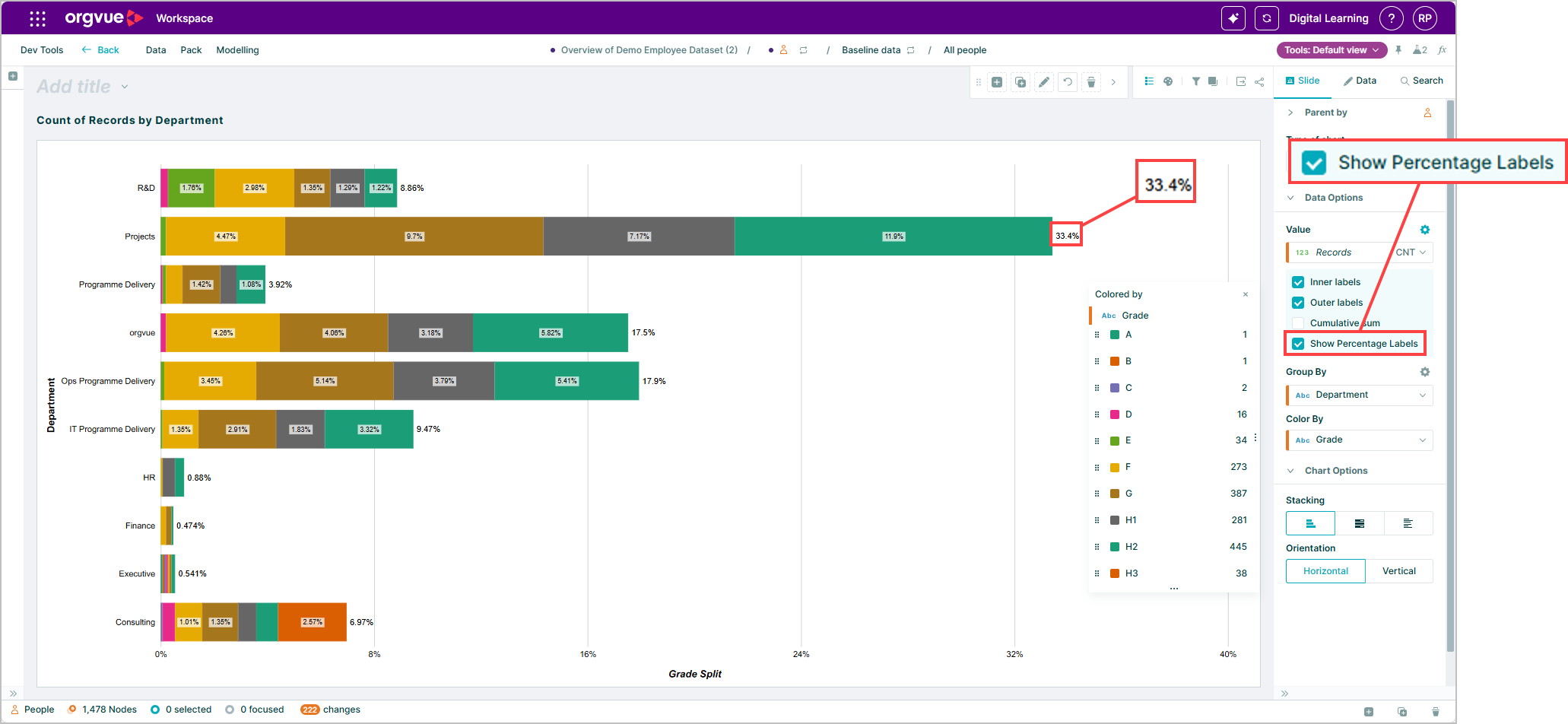
The labels make proportional data easier to read without asking people to calculate shares from the underlying numbers. That can help when comparing workforce composition, cost distribution or any other measure where the relative contribution is central to the story.
Because the context sits on the chart, the exported or shared view remains understandable without a separate table or explanation. Use percentage labels when proportion is the key message, and retain the value labels that best support the decision you want the audience to make.
Explore the Orgvue platform
FAQ: Percentage labels on bar charts
Yes. Percentage labels can appear directly on the chart to show how each segment contributes to the total.
Use them when the relative contribution of each segment is important, such as comparing workforce composition or cost distribution.
They add proportional context to the chart. Choose the value labels that best support the question and audience for the analysis.