Analyze and share grouped worksheet data
Orgvue product update
Grouping a worksheet can turn detailed workforce records into a useful management view. Orgvue now makes that view easier to interpret and take beyond the platform.
When you group worksheet rows and aggregate values, column totals are shown alongside the grouped results. This gives you an immediate view of the overall numbers without having to calculate them separately.
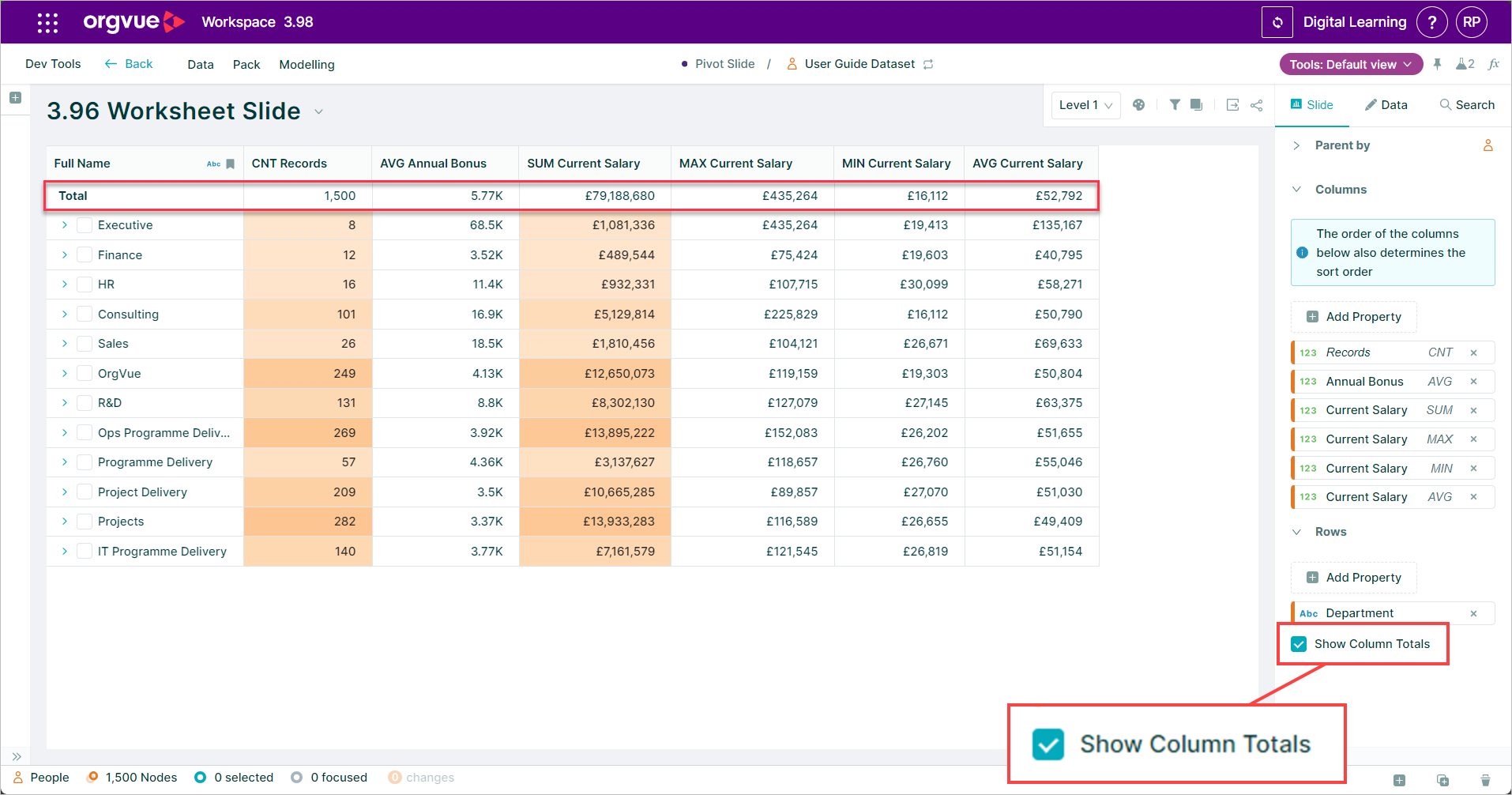
You can also export the aggregated values to CSV. That means the grouped view you use to explore data in Orgvue can be shared with colleagues or used in another analysis without first rebuilding the calculations.
Together, these improvements reduce the manual work between finding an insight and sharing it. Whether you are comparing workforce cost across functions, reviewing headcount by location or summarizing another organizational measure, the totals and export reflect the grouped view you have already created.
Open a worksheet in Orgvue, add a row grouping and choose the aggregation that supports your analysis to get started.
Explore the Orgvue platform
FAQ: Grouped worksheet data
Column totals show the overall aggregated values for the grouped worksheet view. They let you see the headline numbers alongside the grouped results without calculating them separately.
Yes. You can export the aggregated values from a grouped worksheet to CSV for further analysis or sharing.
The export contains the aggregated values from the grouped view you created, so you do not need to rebuild those calculations outside Orgvue.