Find the right Orgvue user guide from inside the product
Orgvue product update
Help is most useful when it is easy to reach from the task you are completing. Orgvue user guides are now available through the product’s help menu for signed-in customers.
Open the ? menu in any Orgvue application, select User guide index, then choose the guide you need.
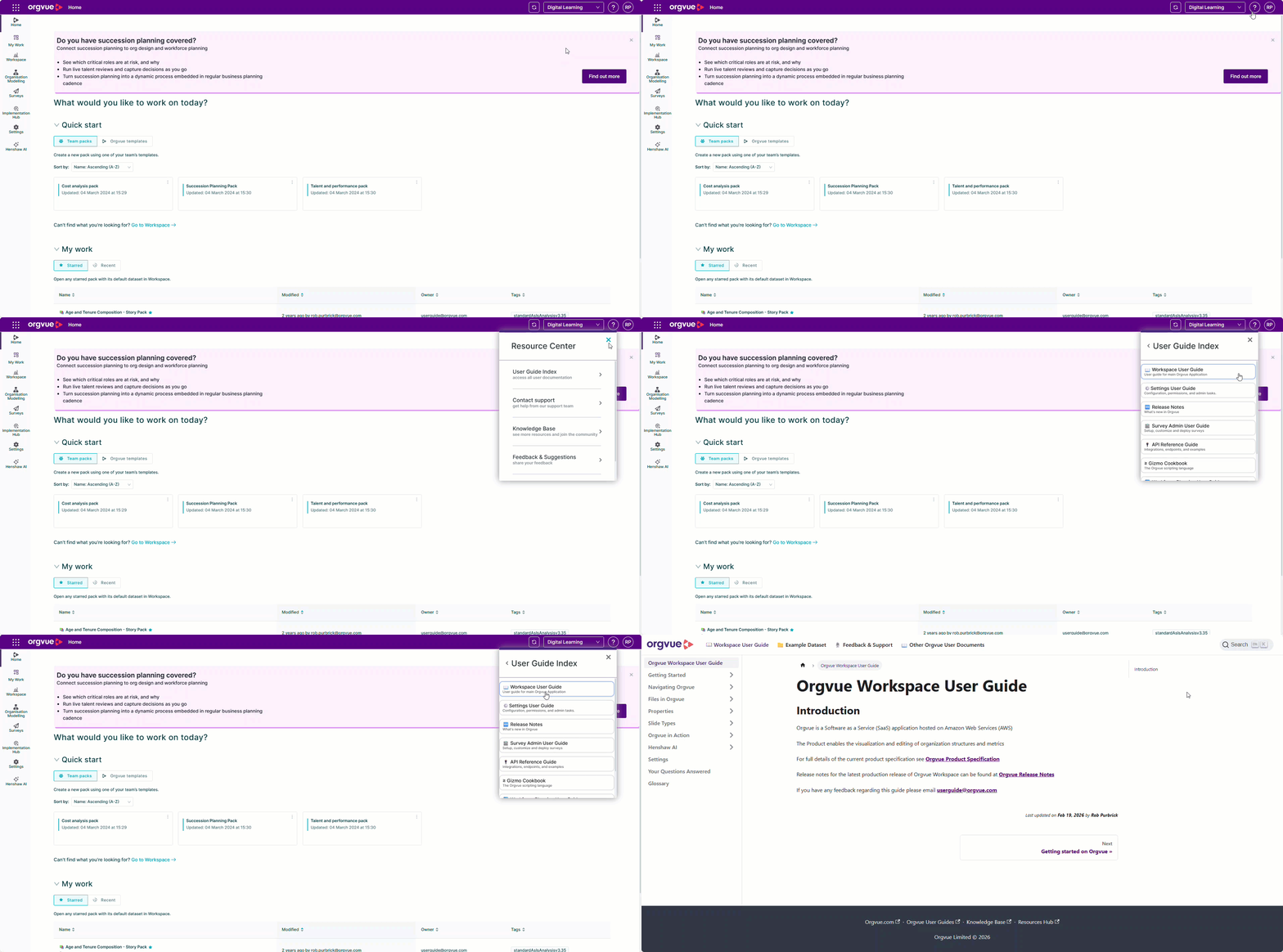
Opening guidance from inside Orgvue gives you access automatically. If you follow a direct guide link from elsewhere, you may be prompted to sign in to your Orgvue tenant first.
Keeping the guides behind an Orgvue login helps ensure that customers reach content that is current and relevant to their region and product environment. It also creates a consistent starting point for finding guidance across Orgvue applications.
The next time you need help with a workflow, begin with the ? menu rather than searching for a separate documentation site.
Explore the Orgvue platform
FAQ: Finding the right Orgvue user guide
Open the ? menu in any Orgvue application, select User guide index, then choose the guide you need.
Opening a guide from inside Orgvue gives you access automatically. A direct guide link from elsewhere may prompt you to sign in to your Orgvue tenant first.
The signed-in route helps users to guidance that is current and relevant to them.