Understand what is driving future workforce demand
Orgvue product update
A demand projection is more useful when you can see what sits behind it. Orgvue Workforce Planning now provides a detailed table that breaks future demand down by each contributing driver.
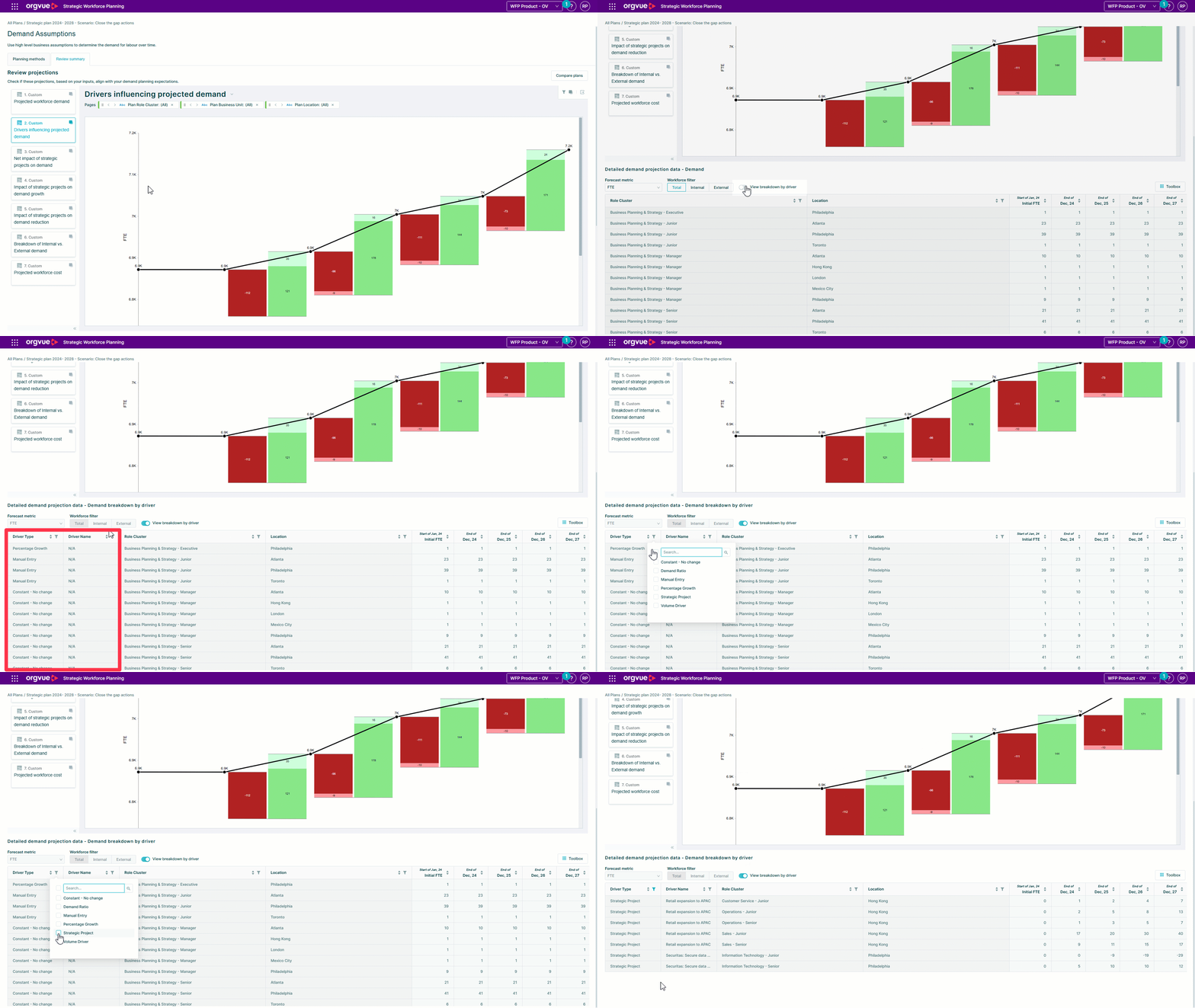
The Detailed Driver Breakdown Table brings the components of a projection into a clear, accessible view. Planners can inspect how individual drivers contribute to the total, check assumptions and explain the result to stakeholders with more confidence.
The table also makes the detail easier to extract for further analysis or reporting. That helps reduce the manual work of reconstructing a projection outside the planning flow just to understand or communicate its composition.
Use the breakdown when reviewing a demand plan, challenging a scenario or preparing an explanation for HR, Finance and business leaders. It connects the headline number to the operational assumptions that created it.
Explore the Orgvue platform
FAQ: Detailed Driver Breakdown Table
It breaks a future workforce demand projection into its contributing drivers, connecting the headline total to the assumptions behind it.
Workforce planners can use it when reviewing a demand plan, challenging a scenario or explaining a projection to HR, Finance and business leaders.
The table makes the driver detail easier to extract for further analysis or reporting, reducing the need to reconstruct the projection manually.