Give survey participants a more personal welcome
Orgvue product update
The first screen of a survey should reassure participants that they are in the right place. Orgvue can now use a person’s name to make that welcome clearer and more natural.
When Full name is included in the people dataset, the survey welcome screen displays the participant’s name instead of their email address.
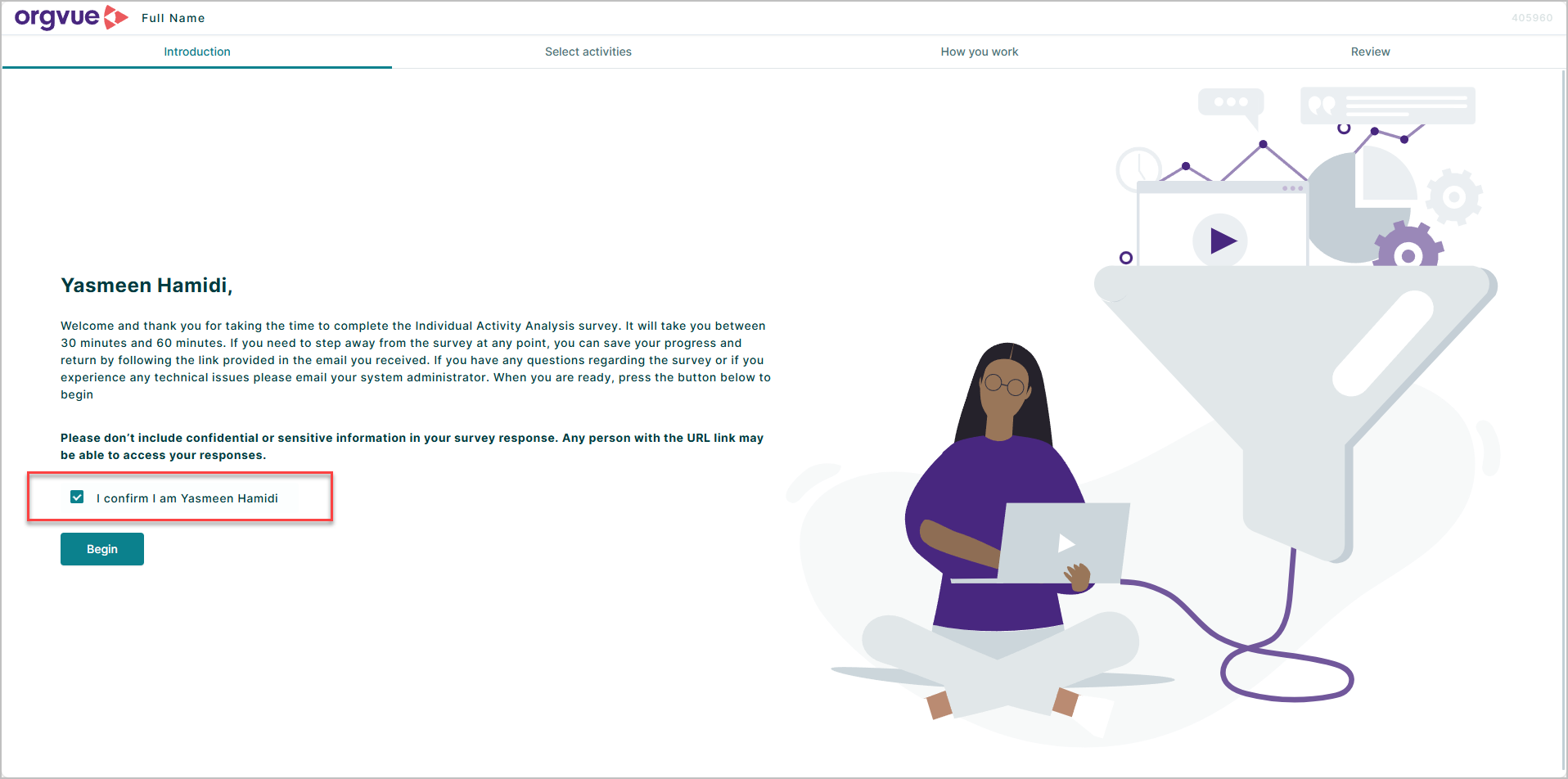
This is a small change to the interface, but it helps the invitation feel more intentional and makes the participant’s context immediately recognizable. It is especially useful in large survey programs where people may receive several automated communications.
Survey administrators do not need to add a separate display setting. Include the Full name property in the people data used for the survey and Orgvue uses it on the welcome page.
Explore the Orgvue platform
FAQ: Personal welcomes
Yes. When Full name is included in the people dataset, the survey welcome screen displays the participant’s name instead of their email address.
No. Include the Full name property in the people data used for the survey and Orgvue uses it on the welcome page.
It makes the welcome feel more intentional and helps reassure the participant that they have opened the correct survey.