Show proportions clearly in funnel charts
Orgvue product update
Funnel charts make a sequence of stages easy to see. With percentage labels, they can now communicate the relative size of those stages just as clearly.
You can display percentages directly on a funnel chart in Orgvue. Readers no longer have to estimate proportions from the shape or calculate them from the underlying values.
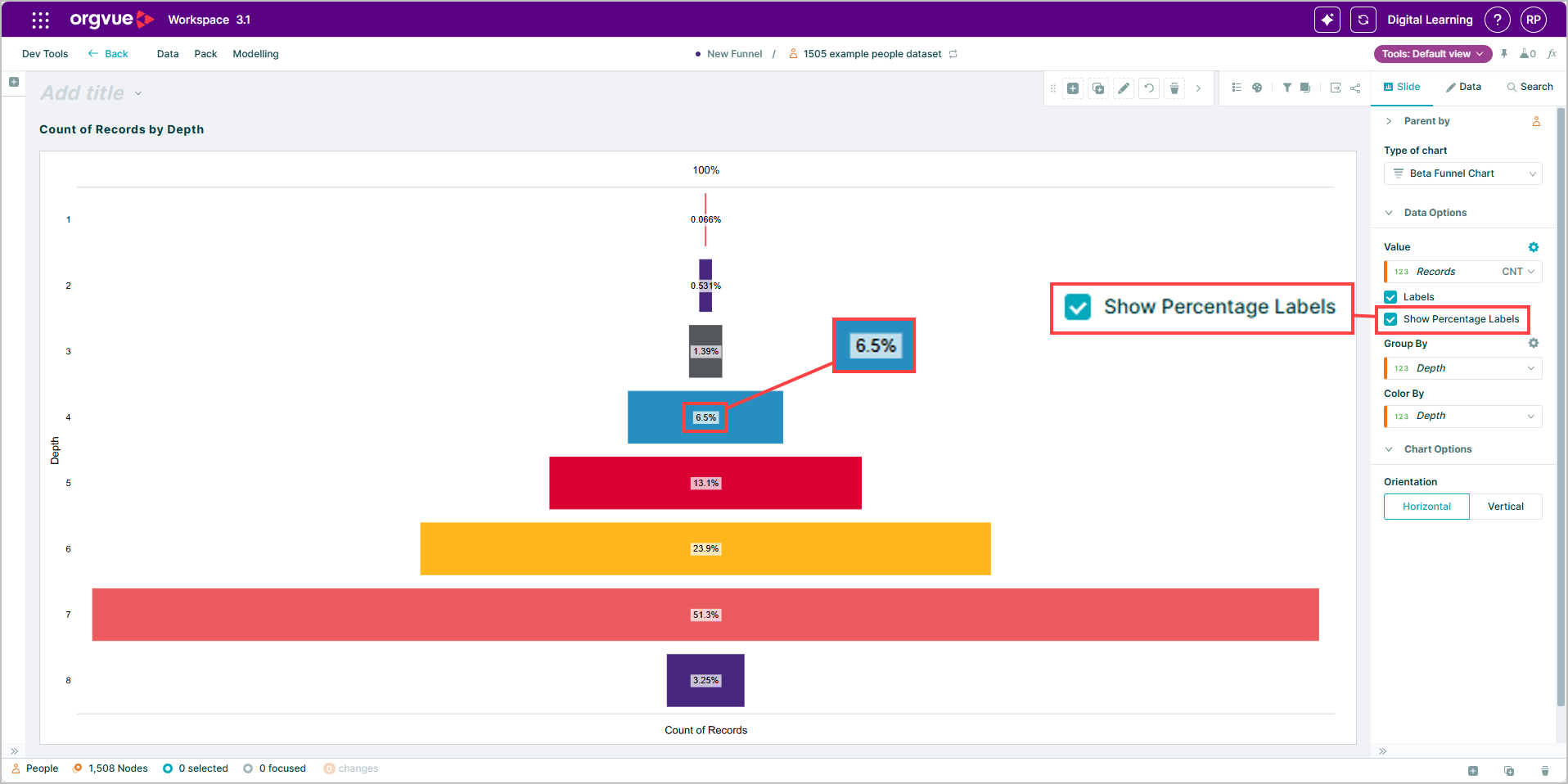
The additional context is useful when showing how a population narrows through a process, comparing groups across stages or presenting an outcome to stakeholders who need the main message quickly.
Turn on percentage labels when the relationship between stages matters to the story. Keep them hidden when the absolute values are enough. This gives you a simple way to match the chart to the question and the audience without rebuilding the underlying analysis.
Explore the Orgvue platform
FAQ: Funnel charts
Yes. You can show percentages directly on a funnel chart so readers can understand the relative size of its stages.
Use them when the relationship between stages is central to the story, such as showing how a population narrows through a structure.
Yes. Keep them hidden when absolute values provide enough context for the audience.